
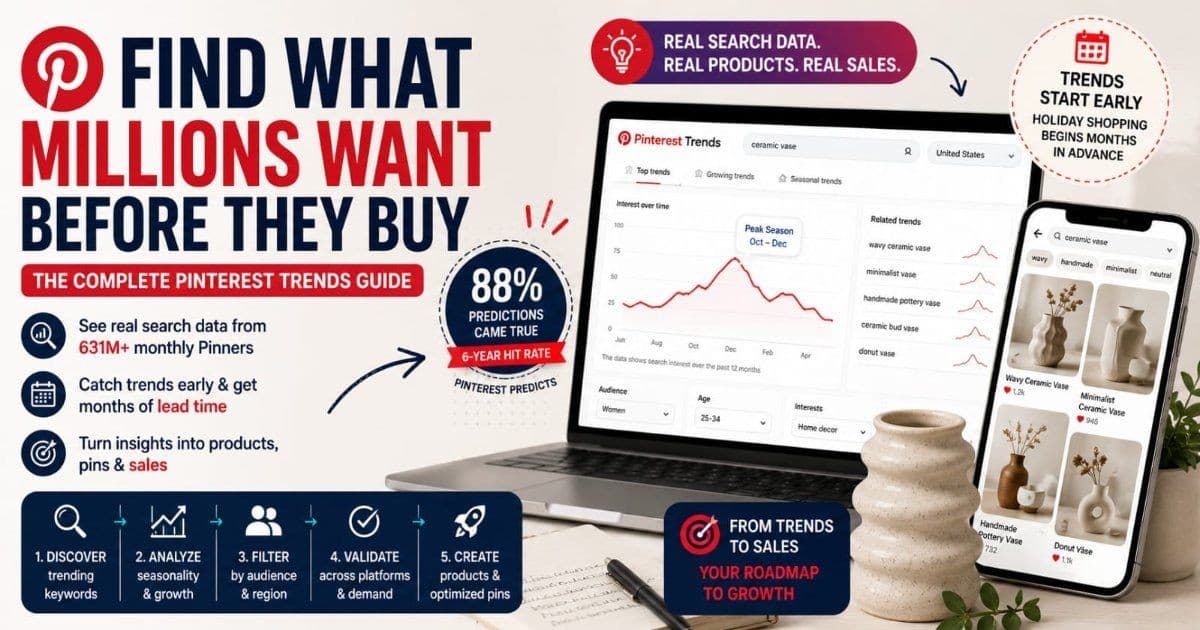
Most sellers decide what to make next by instinct: a competitor did well with something similar, a customer asked for it, or it just feels right. Sometimes that works. But there's a free tool showing you what millions of shoppers are starting to search for — months before they buy — and most sellers have never opened it.
Pinterest Trends exposes real search data from Pinterest's 631 million monthly users (Pinterest, Q1 2026 earnings, May 2026). Because people use Pinterest to plan — weddings, holidays, home makeovers, wardrobe changes — demand shows up there while it's still an idea, not yet a purchase. For a seller deciding what to stock, design, or list next, that lead time is the whole game.
This guide gives you the repeatable workflow: how to read the tool, a five-step research process, validation methods so you don't chase a bubble, and the pipeline from trend finding to published pin.
Key Takeaways
- Pinterest Trends is free, works with any account type, and shows about 12 months of real search data with region, age, gender, and category filters (Pinterest Business help).
- Pinterest surfaces demand early because Pinners plan purchases months out — holiday searches start appearing on Pinterest well before other platforms (Pinterest Business).
- Pinterest Predicts, the annual forecast report, has an 88% six-year hit rate (Pinterest Business) — a planning runway most sellers ignore.
- Validate before you produce: triangulate Pinterest data against Etsy search, Google Trends, and Amazon to separate real demand from a platform bubble.
Why Pinterest Trends Beats Google Trends for Product Research
Google Trends tells you what people are searching for now. Pinterest Trends tells you what they're planning to buy next — and for physical products, the second signal is worth more.
The difference is user behavior. People go to Google with immediate questions and to Pinterest with future plans: the nursery due in five months, the December wedding, the kitchen refresh. Pinterest's own data shows holiday shopping behavior starting months ahead of other platforms — the company has publicly urged brands to plan for Christmas from the middle of the year because its users already are (Pinterest Business, "The Holidays Are Earlier Than Ever"). By one analysis of Pinterest data, 56% of Pinners begin holiday purchase planning as early as September (via Searchlab, 2026).
Two more reasons the data suits product sellers specifically. First, Pinterest queries are visual and product-shaped — "sage green kitchen decor," not "how do I decorate a kitchen" — so trends map directly onto things you can make. Second, searches skew unbranded (97% of top searches, per Pinterest Business), which means the demand is up for grabs rather than owned by a brand.
Google Trends still has a role — we'll use it as a validation layer later. But as the discovery instrument for consumer products, Pinterest looks further down the road.
The Two Tools: Pinterest Trends and Pinterest Predicts
Pinterest gives sellers two distinct research instruments, and they answer different questions:
Pinterest Trends (pinterest.com/trends) is the live tool: type a keyword, see its search curve over roughly the past 12 months, filter by region and audience, and browse what's currently rising. It answers "what's happening with this niche right now, and when does demand peak?" This is your week-to-week instrument.
Pinterest Predicts is the annual report: each year Pinterest publishes a set of trends it expects to break out over the coming year, built from its search data. It answers "what should I be designing for six months from now?" And its track record is unusually strong — Pinterest reports that 88% of its predictions over the last six years came true (Pinterest Business, About Pinterest Predicts, 2026).
Use them together: Predicts for the yearly bet, Trends to verify the bet is materializing and to time your launch.
Getting Into Pinterest Trends: What You Get for Free
Everything, essentially. The tool is free, requires no business account (just a login), and covers the major e-commerce markets — US, UK, Canada, Australia, and a growing list of others (Pinterest Business help).
The capabilities that matter for product research, described by function since the interface shifts periodically:
- Keyword search with a trend graph — about 12 months of search history for any term.
- Region filter — data per country, which becomes important for the international play covered below.
- Trend browsing in four flavors — top trends for the recent month, top for the year, growing trends (rising over the recent quarter), and seasonal trends (recurring at the same time each year).
- Audience filters — age, gender, and interest category, so a jewelry seller can look at what's rising specifically with the demographic that buys from her.
- Term comparison — overlay several keywords on one graph to settle "should I make the mushroom lamp or the wave lamp?" with data instead of instinct.
Ten minutes in the tool, filtered to your category and market, beats an afternoon of scrolling competitors' shops.
How to Read a Trend Graph Before Betting Money on It
A trend line only means something against its own history. Four patterns cover most of what you'll see:
- Seasonal wave. Rises and peaks at the same time every year ("dried flower wreath" every autumn). The most tradeable pattern there is: you know demand is coming and exactly when.
- Sustained climb. Growing steadily across quarters without collapsing back. This signals a durable shift worth building products around, not just a moment.
- One-off spike. A sharp peak that decays as fast as it rose — usually a viral moment or news event. By the time you've produced inventory, the wave is gone.
- Slow fade. A term drifting down year over year. Fine to serve with existing stock; wrong to build new products for.
The discipline: always ask "compared to what?" A term at its 12-month high on a seasonal wave is normal; the same reading on a sustained climb is a signal. And check the same month last year before celebrating growth — rising from January into February happens to almost everything in home and wedding niches.
The 5-Step Product Research Workflow
Here's the repeatable loop, start to finish. It takes about an hour the first time and half that once it's routine.
Step 1: Start From a Seed Keyword or Category
Type your core product term ("ceramic vase," "baby blanket," "wall print") into Pinterest Trends, or browse the growing-trends view filtered to your product category. You're not looking for a verdict yet — you're mapping the territory around your niche.
Step 2: Explore the Related Terms
Every search surfaces related and rising queries — the modifiers shoppers attach to your product. This is where the actual product ideas live. "Ceramic vase" is a category; "chunky ceramic vase" or "wavy vase" is a product brief. Collect every rising modifier into a list; these are your candidates.
Step 3: Check the Seasonality
For each candidate, read its 12-month curve against the four patterns above. Note when it peaks. This tells you not just whether to make it but when it must be photographed, listed, and pinned — a date you'll work backwards from.
Step 4: Overlay Region and Demographics
Filter to the market you actually ship to, and to the audience that actually buys from you. A trend rising with US women 25–34 matters to most Etsy sellers; the same trend carried entirely by a demographic you don't reach is a mirage. Comparison-graph your top three candidates for the same audience and let the curves rank them.
Step 5: Cross-Reference With Your Own Platform
Pinterest tells you what people want; your selling platform tells you what they're buying and how crowded the shelf is. Type the candidate term into Etsy's search bar and read the autocomplete — if it appears, purchase demand exists. Then look at the results count and who's ranking. Shopify sellers can check their own analytics for which existing products and regions the trend touches. This step is also where you harvest the exact title words — our Etsy keyword research guide covers that half of the job.
Research Angles by Product Category
The workflow is the same everywhere, but where you point it differs by niche:
| Niche | What to research | The angle | |-------|-----------------|-----------| | Fashion & accessories | Color and material terms by season | Colors trend on Pinterest before they hit stores — search "[color] outfit" terms in the prior season | | Home decor | Named aesthetics | Shoppers search by aesthetic ("coastal grandma," "dark academia") — rising aesthetic terms are product briefs for every category in the house | | Food & gifts | Holiday cycles | Seasonal-trend view is your calendar; gift searches ramp months early, as our holiday gift-guide SEO article shows | | Weddings | The booking window | Brides plan 9–12 months out — trends among newly engaged Pinners predict next season's wedding purchases |
The named-aesthetic angle deserves emphasis for decor and print-on-demand sellers. When an aesthetic starts rising, it drags dozens of product searches with it — wall art, pillow covers, phone cases, stationery. Catching the aesthetic early means an entire themed collection, not just one item.
Catching Trends Early With Growing Terms
The growing-trends view (Pinterest's rising-search flag — the equivalent of Google's "breakout" label) is where early money is made and lost. A term growing fast from a small base is either next season's staple or this month's fad, and the difference decides whether you produce.
Validate before you commit inventory. Three checks:
- Age of the climb. A term that's been rising for one week is noise; ten to twelve weeks of steady growth is a pattern.
- Neighbor terms. Real trends spread — if "checkerboard rug" is rising, a real trend also lifts "checkerboard blanket" and "checkered decor." A single rising term with silent neighbors is usually one viral pin, not a movement.
- Cheapest possible test. Before production, test with content: publish pins of a mockup or prototype and watch saves. Print-on-demand and digital sellers can list the design itself. Saves on the pin are pre-orders in spirit — signal before spend.
What we've seen: the sellers who win trends aren't the fastest to produce — they're the fastest to test. A mockup pin that gathers saves for two weeks tells you more than any graph, because it's your product meeting the actual demand.
Pinterest Predicts as a Yearly Planning Tool
Once a year, Pinterest hands sellers a forecast with an 88% historical hit rate (Pinterest Business, 2026) — and most sellers never read it. The report lists dozens of predicted trends across fashion, home, food, beauty, and celebrations, each grounded in search-data momentum.
How to work it:
- Filter for your lane. Only a handful of the predictions will touch your niche. Ignore the rest without guilt.
- Verify with Trends. Before betting, look each relevant prediction's keywords up in Pinterest Trends. A prediction whose terms are already climbing is confirmation; one that's flat in your market can wait.
- Use the runway. The report lands before the trends peak — that's a 6–9 month lead to design, produce, photograph, and let pins build engagement. The report's value isn't the ideas; it's the head start.
Treat it as an annual planning ritual: one afternoon with the report and the Trends tool, and your product calendar for the year has a data-backed backbone.
Triangulation: Confirming a Trend Beyond Pinterest
Pinterest data has a known bias: visual, planning-oriented, and skewed toward the platform's demographic. Before a serious inventory commitment, triangulate with two outside signals:
- Google Trends answers "is this real outside Pinterest?" A term rising on both platforms is a genuine consumer movement; a term rising only on Pinterest may be a platform aesthetic that never converts elsewhere. Remember the sequencing — Pinterest often leads, so flat-but-not-absent on Google can simply mean early.
- Amazon Best Sellers and Movers & Shakers answer "is anyone paying for it yet?" If products matching the trend are climbing Amazon's category charts, wallets have opened. If Amazon is saturated with cheap versions, your handmade angle needs differentiation to survive — or the moment has passed for commodity versions.
The pattern you want: rising on Pinterest, confirmed or early on Google, present-but-not-crowded on Amazon and your own platform. Three signals agreeing is a product decision; one signal alone is a hypothesis.
The Second Wave: Riding a Trend Across Regions
Trends don't peak everywhere at once — and the region filter turns that lag into a second bite at the same trend. A term that has plateaued in the US is often still climbing in the UK, Canada, or Australia months later.
The move: take any trend you caught (or missed) domestically and re-run its curve per region. If it's still rising in a market you can ship to, your existing product, photography, and pins get a second season — often with less competition, since most US sellers never check. Watch the seasonal inversion for Australia and New Zealand: their summer is the northern winter, so "linen beach dress" demand runs on an opposite calendar.
This is also the cheapest international expansion test available: demand data per country, free, before you commit to international shipping rates.
Common Mistakes in Pinterest Trend Research
- Chasing spikes without seasonality context. A term exploding in October might be a discovery — or just October. Always compare against the same period last year before producing.
- Ignoring saturation. High search volume with thousands of established listings mostly feeds the incumbents. The winnable play is usually the rising modifier of a crowded term, where demand is climbing and dedicated supply hasn't caught up.
- Forgetting the lead time. Pins need weeks to build distribution — publish 6–8 weeks before peak search, which means producing earlier still. Catching a trend at its peak on Pinterest means arriving as demand leaves.
- Researching without a demographic filter. Unfiltered data blends audiences that will never buy from you. Filter to your buyer before drawing conclusions.
- Treating one good month as a strategy. The tool rewards routine. A monthly 30-minute check of your niche's growing terms compounds; a single research binge doesn't.
From Research to Pin: The Trend-to-Listing Pipeline
A trend finding only pays when it becomes content that ranks before the peak. The pipeline, working backwards from the peak month you identified in Step 3:
- Produce or mock up the product with enough lead time for your craft.
- Shoot one photo session, harvest many assets — hero shot, detail, lifestyle, scale. This set feeds the listing, the pins, and the story pin all at once.
- List it with trend-matched keywords on Etsy or Shopify, using the exact phrasing shoppers type — the wording you harvested during research.
- Optimize the images before upload. Trend-keyword filenames and alt text make the same photos rank in Pinterest search and Google Images — ImgSEO generates both, plus embedded metadata, in one batch pass.
- Publish a story pin and standard pins 6–8 weeks before peak: a multi-frame pin for discovery (our Idea Pins guide covers the frame structure) and standard pins targeting each keyword variant, following the system in our Pinterest SEO guide. Pin sizing and image specifics are in the Pinterest image SEO guide.
- Watch saves and outbound clicks as the peak approaches, and double down on the variants that move. Etsy sellers: the full pin-to-shop mechanics are in our Pinterest traffic guide for Etsy.
Research → product → optimized images → pins → traffic. Each trend you catch runs the same loop, and the loop gets faster every time.
FAQ
Is Pinterest Trends accurate for product research?
Yes, within its lane. The data comes straight from real Pinterest searches, and Pinterest's annual forecasts built on the same data have an 88% hit rate over six years (Pinterest Business). Its bias is the platform's bias — visual, consumer, planning-oriented — so validate against Etsy search, Google Trends, or Amazon before committing inventory.
How far in advance should I plan for a Pinterest trend?
Work backwards from the peak: publish pins 6–8 weeks before peak search so they build distribution in time, and start production earlier based on your lead time. For Pinterest Predicts trends, treat the annual report as a 6–9 month runway. Pinners plan seasonal purchases months ahead (Pinterest Business), so "early" on Pinterest is earlier than you think.
Is Pinterest Trends free, and do I need a business account?
It's free and works with any account type — no business account required, though you need to be logged in. Coverage includes the US, UK, Canada, Australia, and other major markets, with roughly 12 months of search history and region, age, gender, and category filters (Pinterest Business help).
What's the difference between Pinterest Trends and Pinterest Predicts?
Pinterest Trends is the live tool: real-time keyword search curves with filters, for week-to-week research and timing. Pinterest Predicts is the annual forecast of trends expected to break out over the coming year. Use Predicts to place the yearly bets and Trends to verify each bet is materializing before you spend.
How do I know a trend isn't already saturated?
Check supply against demand. Search the term on your own platform — if Etsy returns thousands of listings with entrenched best-sellers, rising search volume mostly feeds them. The winnable version is usually a sub-niche: a growing modifier of the trend where searches are climbing but dedicated listings remain scarce.
Conclusion
Guessing what to make next is the most expensive habit in e-commerce — every wrong guess costs materials, photography, listing time, and a season of shelf space. Pinterest Trends replaces the guess with a free view into what millions of shoppers are starting to want, months before they buy it. Pinterest Predicts extends that view to a year.
The workflow is the product: seed keyword, related terms, seasonality, audience filter, platform cross-check — then triangulate, test with a mockup pin, and launch 6–8 weeks ahead of the peak. Run it monthly and trend-catching stops being luck.
When a trend does check out, the images carry the launch: they're what ranks on Pinterest and Google, and what shoppers click. ImgSEO gets them ready in one pass — trend-keyword filenames, AI alt text, and embedded metadata for every product photo in the batch. Try it free on your next collection, no credit card required.


