
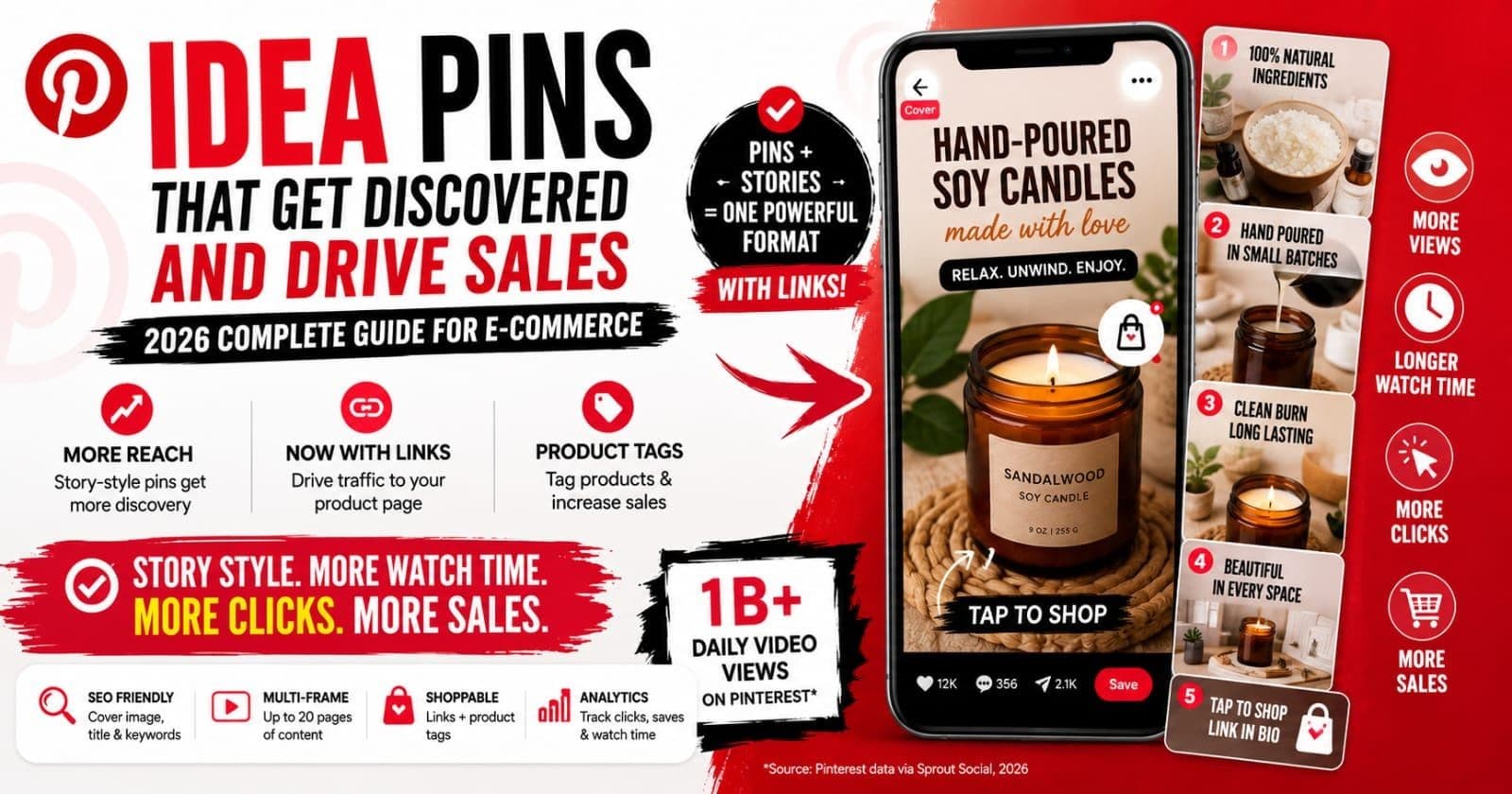
You've seen them in your feed: multi-page pins with video, music, and that unmistakable algorithm push. And you've probably heard two contradictory things about Idea Pins — that Pinterest loves them, and that they can't link to your store, which makes them useless for sellers.
Here's what most guides won't tell you upfront: both facts are out of date. Pinterest retired Idea Pins as a separate format in mid-2023 and folded everything into one unified Pin type (TechCrunch, "Pinterest is combining Pins and Idea Pins into a single format", May 2023). The multi-frame, story-style content survived — but now it carries outbound links, product tags, and every editing tool Pinterest has. The reach advantage stayed; the traffic penalty left.
That changes the math for e-commerce completely. This guide covers what the format is now, why story-style pins still get preferential discovery, and how to structure them so viewers end up on your product page instead of just admiring your work.
Key Takeaways
- Idea Pins no longer exist as a separate format — Pinterest unified all pin types in 2023 (TechCrunch), and multi-frame pins now support outbound links.
- The old tradeoff (discovery reach vs. no traffic) is gone; story-style pins can send viewers straight to your product page.
- Your cover frame is what appears in search results, so its keywords, text overlay, and image metadata carry more SEO weight than every other frame combined.
- Structure sells: hook frame, context, product reveal, detail, then a call-to-action frame — in that order.
What Are Idea Pins, and Do They Still Exist?
As of writing, Idea Pins don't exist as a separate format. Pinterest announced the unification in May 2023: one Pin type that supports images, video, or both, with links, music, stickers, product tagging, and post-publish editing available on everything (Pinterest Create, "All the Details About the New Pin Update", 2023). Old Idea Pins were converted into video pins. When you upload multiple images or clips today, Pinterest stitches them into a single video pin.
So why does everyone still say "Idea Pins"? Because the name stuck, sellers still search for it, and the style — a multi-frame visual story with a cover, a sequence, and an ending — is alive and well. Throughout this guide, "Idea Pin" means that story-style multi-frame pin, built in the current unified format.
Here's how the pin types compare for an e-commerce seller:
| Format | What it is | Links out? | Best for | |--------|-----------|------------|----------| | Standard pin | Single image | Yes | Search volume — one keyword per pin | | Video pin | Single video or stitched frames | Yes (as of writing) | Feed attention, story-style content | | Idea-style pin | Multi-frame video with overlays and music | Yes (as of writing) | Discovery, process stories, tutorials | | Rich Pin | Any pin enhanced with live site metadata | Yes | Automatic price and stock accuracy |
Rich Pins aren't a rival format — they're a metadata layer that can enhance the others; our Rich Pins setup guide covers enabling them. And our Pinterest SEO guide for e-commerce covers how all of these fit into a search strategy.
Why Does Pinterest Boost Story-Style Pins?
Because they keep people on the platform longer, and dwell time is an engagement signal Pinterest values highly. A static pin earns a glance; a multi-frame pin earns six, ten, fifteen seconds of watching. Video now drives nearly 1 billion views a day on Pinterest (Pinterest data, via Sprout Social, 2026), and the algorithm feeds formats that generate that attention.
There's a revealing detail in the format's history. Pinterest didn't merge Idea Pins because they failed — it merged them partly because they worked too well. The engagement they generated overpowered every other pin type and flooded the feed, which pushed Pinterest to rebalance the whole system (TechCrunch, 2023). The distribution advantage of story-style content was strong enough to distort the platform.
For sellers, the takeaway is simple: that engagement advantage didn't vanish, it got housed in a format that now links to your store. Multi-frame video content still earns the longer watch, still signals quality to the algorithm, and now carries a click-through path that early Idea Pins never had.
The Traffic Problem That (Mostly) No Longer Exists
The original Idea Pin's fatal flaw for e-commerce was the missing link. You could reach 100,000 people and send exactly zero of them to your store. Sellers invented workarounds — "link in bio," posting a standard pin right after, hoping viewers would search your shop name. Clunky, leaky, mostly ineffective.
Unification fixed the core problem. As of writing, every pin — including multi-frame video pins — supports a destination link. But two of the old workarounds are still worth keeping, because they've turned from crutches into multipliers:
- Product tags overlay tappable products onto your frames, giving shoppers a route to specific items even when the pin's main link points elsewhere (say, a blog post or lookbook). More on these below.
- The standard-pin follow-up is now a repurposing strategy rather than a patch. Your story pin builds interest; keyword-targeted standard pins of the same product capture searches. Both link out, and they reinforce each other.
The one habit to drop: leaving the destination link blank because "Idea Pins don't have links." Check every story-style pin you publish. No link means the reach is decorative.
Anatomy of an Idea-Style Pin
Knowing the parts helps you optimize each one deliberately:
- Cover frame. The first image or video frame — and the only thing most people ever see, because it's what appears in search results and feeds. It gets its own section below.
- Frames (up to 20 pages). The sequence of images or clips. You almost never need 20; five to seven is the practical range before viewers drop off.
- Video vs. stills. Multiple uploaded assets stitch into video. Motion in the first two seconds holds attention better than a static open, even if it's just a slow zoom on the product.
- Text overlays. On-image text per frame. This is where your story gets told for the majority who watch muted.
- Music and stickers. Engagement dressing. Fine in moderation — with a caution about trending audio we'll cover in the mistakes section.
- Product tags. Tappable product markers linked to your catalog items — the direct commerce layer.
The Frame Structure That Sells Products
Story-style pins fail for sellers when they're structured like entertainment instead of a path to a product. This five-frame arc works because each frame has one job:
- Hook frame. Your product, visible, in the first second — plus a reason to keep watching ("How this mug gets its glaze"). Curiosity without the product is a mistake we'll come back to.
- Context frame. Where the product lives: the styled shelf, the outfit, the gift moment. Context frames let shoppers picture ownership, which is what converts a browser into a saver.
- Product reveal. The hero shot — clean background, best angle, the image you'd use as a listing photo. Tag the product here.
- Detail and scale frame. The closeup of texture, the product in hand, the dimensions overlay. This answers the questions that stop purchases ("how big is it really?").
- Call-to-action frame. Tell viewers what to do: "Tap to shop," "Save this for gift season." Pins with an explicit CTA frame outperform ones that just... end.
One product, five frames, one link, product tags on top. That's the whole recipe.
Cover Image SEO: The Frame That Does the Ranking
Here's the part most sellers miss: in search results, your entire multi-frame pin is represented by one image — the cover. Pinterest's search algorithm leans on the cover image, the pin title, and the description to decide which queries you belong in. Frames two through seven are for viewers; the cover is for the algorithm.
Treat the cover like a standalone standard pin:
- 2:3 vertical, 1000 × 1500 px, same as any pin — square or landscape covers surrender feed space.
- Keyword-bearing text overlay ("Hand-Poured Soy Candles" beats "Watch this!"), because the overlay is readable at thumbnail size and reinforces relevance.
- Optimized image file. Give the cover a keyword-rich filename before upload (
hand-poured-soy-candle-amber.jpg, notIMG_2047.jpg) and descriptive alt text. These are the same signals that rank images in Google, and ImgSEO generates both automatically — so the cover you export is already carrying its keywords when it hits Pinterest.
Our Pinterest image SEO guide goes deep on dimensions, formats, and alt text; the complete image SEO guide covers the underlying principles that apply everywhere your images appear.
Text Overlay Strategy for Multi-Frame Pins
Most Pinterest viewing happens on phones, often muted, often at thumbnail size first. Your overlays carry the story, so design them for the worst-case viewing condition:
- Readable at thumbnail size. If you can't read it when the pin is two inches tall, shrink the message, not just the font. Five words a frame beats fifteen.
- Keyword-rich but conversational. "Sage green ceramic mug, wheel-thrown" reads naturally and matches searches. A hashtag pile doesn't.
- Contrast is non-negotiable. Solid or semi-opaque text backgrounds, high contrast against the image. Trendy low-contrast beige-on-cream text costs you every viewer over 40 and half the ones under.
- Brand consistent. Same one or two fonts, same colors, every pin. Recognition in the feed compounds: shoppers who've seen your pins before click at higher rates, and clicks feed ranking.
Product Tags and the Verified Merchant Program
Product tags turn frames into shoppable surfaces — a viewer taps the marker and lands on that product. For multi-frame pins where the main link can only point one place, tags let a single story sell several items.
Tagging from your own catalog requires connecting one, and the full experience runs through Pinterest's Verified Merchant Program. As of writing, VMP is free and requires: an account at least three months old, the Pinterest Tag installed on your site, a product catalog synced so pricing and stock stay current within seven days, at least half your catalog ingesting successfully, and compliance with Pinterest's merchant guidelines (Pinterest Business help, Verified Merchant Program). Verified merchants also get a badge and eligibility for enhanced shopping surfaces.
Shopify and WooCommerce stores can meet the catalog requirement through their Pinterest app integrations. Etsy sellers get product metadata flowing through Pinterest's Etsy integration and Rich Pins — our Etsy Pinterest traffic guide covers that setup step by step.
Which Board Should Story-Style Pins Live On?
The most keyword-relevant niche board, not your biggest one. Board context is a relevance signal: a candle-making story pin saved to "Hand-Poured Soy Candles" inherits that topical context in search; the same pin on a general "Our Products" board inherits mush.
The instinct to pin to your largest board for "maximum exposure" gets the mechanics backwards. Discovery on Pinterest flows from search and interest matching, not from board follower counts. A tight board tells the algorithm exactly which searches your pin belongs in — that's what maximizes distribution. If the pin genuinely fits two niche boards, publish to the most specific one first, then save it to the second a week later. Same asset, two relevance contexts, spaced so it doesn't read as spam.
Keyword Optimization for Story-Style Pins
The same keyword system from our Pinterest SEO guide applies — title, description, board context — but the weighting shifts in two ways for multi-frame pins.
First, engagement counts for more. Story-style pins generate richer signals (watch time, frame progression, tag taps), so a pin that hooks viewers can outrank a better-keyworded pin that doesn't. Keywords get you into the search results; the first two seconds decide whether you stay there.
Second, the cover concentrates the visual relevance signal. Pinterest's visual recognition reads your cover image and matches it to related content, so a cover that clearly shows the keyword — the actual mug, candle, or print — reinforces the text. An artsy abstract cover fights your own title.
The practical checklist: primary keyword in the first 40 characters of the title, related phrases woven through the description, keyword-matched board, cover image that visibly depicts the thing being searched. Tag topics honestly — tagging "home decor" on a jewelry pin confuses distribution rather than expanding it.
One Product, Five Pins: The Repurposing Loop
Every story-style pin you build contains a batch of standard pins, and vice versa. Working the loop in both directions is how one photo session feeds a month of pinning:
- Story pin → standard pins. Each frame is a standalone image. The hero shot, the detail closeup, the lifestyle context, the scale shot — export each as a 2:3 standard pin with its own keyword target. One five-frame story becomes four or five search entries.
- Standard pins → story pin. Already have five good product images? Upload them together and Pinterest stitches them into a video pin. Add overlays and a CTA frame, and your existing catalog photography becomes story content with zero new photography.
This loop is also your fresh-pin engine: every re-crop, re-overlay, and re-sequence counts as an image Pinterest hasn't seen, which is exactly what the algorithm rewards distributing.
Common Mistakes With Story-Style Pins
- Treating them like Instagram Reels. Reels are entertainment for followers; Pinterest pins are search results. A trending-audio dance clip with your product in the background matches zero searches. Build for the query, not the trend.
- No keywords on the cover. An unoptimized cover frame wastes the pin's entire search presence — it's the one frame the algorithm shows.
- Over-relying on trending audio. Trends date fast, and a pin should still feel relevant in eight months when it's still surfacing in search. Instrumental or no audio ages better; remember most viewers are muted anyway.
- No product in the first frame. Mystery hooks ("wait for it...") bleed the very viewers who came shopping. Show the product immediately; the hook is why to keep watching, not what it is.
- Publishing without a destination link. A pre-unification habit that's pure waste now. Every pin, every time, links somewhere.
Measuring Story-Style Pins: Which Metrics Predict Traffic
Pinterest Analytics gives multi-frame pins extra instrumentation: impressions, saves, pin clicks, outbound clicks, video watch time, and product tag interactions (Pinterest Business help, Pin stats). They're not equal.
Saves are the leading indicator. A save redistributes your pin to the saver's boards and followers and tells the algorithm the content deserves more search exposure. Story pins with strong early saves keep surfacing for months — the save is a bet on your pin's future distribution.
Outbound clicks and product tag taps are the money metrics, same as everywhere on Pinterest. Watch time tells you whether your frame structure works: viewers bailing after frame one means a weak hook; strong watch time but no tag taps means an attention story with no shopping path — usually a missing CTA frame or untagged product.
Review monthly, find your top story pin by outbound clicks, and run the repurposing loop on it: that pin's frames become next month's standard pins.
FAQ
Do Idea Pins still exist as a separate format?
No. Pinterest retired Idea Pins as a separate format in mid-2023 and unified everything into one Pin type (TechCrunch). Existing Idea Pins were converted to video pins, and the features that made them special — multiple frames, music, stickers, product tagging — now work on all pins. The style lives on; the separate format doesn't.
Can I add a link to an Idea Pin?
Yes, as of writing. The biggest complaint about original Idea Pins was the missing outbound link. When Pinterest unified its formats, links became available on every pin, including multi-frame video pins. Story-style content can now send viewers directly to your product page, which removes the old reach-without-traffic tradeoff.
Are Idea Pins worth it for e-commerce?
The style is worth it, yes. Multi-frame video pins earn longer viewing time than static pins, and video now draws nearly 1 billion daily views on Pinterest (Sprout Social, 2026). Use story-style pins for discovery and engagement, standard pins for search volume, and let each feed the other through repurposing.
Do product tags require the Verified Merchant Program?
Tagging your own products runs through a connected catalog, and the full experience comes with VMP. It's free to join but requires an account at least three months old, the Pinterest Tag on your site, a synced catalog with current pricing, and compliance with merchant guidelines (Pinterest Business help). Platform integrations handle much of it for Shopify, WooCommerce, and Etsy sellers.
What's the ideal length for a story-style video pin?
Short. Industry benchmarks put ideal Pinterest video length at 6–15 seconds, with organic videos under 60 seconds performing best (Sprout Social, 2026). Viewers decide at the cover frame whether to keep watching — show the product immediately and make every frame earn the next one.
Conclusion
The Idea Pin story has a better ending than most sellers realize. The format that offered reach but refused to link is gone; what replaced it keeps the discovery advantage and adds everything e-commerce needed — destination links, product tags, and analytics that show exactly where viewers drop off. The sellers still avoiding story-style pins are working from a limitation that no longer exists.
The playbook: build five-frame stories around single products, treat the cover frame like a standalone search asset, tag products, always link out, and recycle every story into standard pins for search volume. Reach and traffic, from the same content.
And since the cover frame does your ranking, make sure it leaves your computer already optimized. ImgSEO generates keyword-rich filenames, AI alt text, and embedded metadata for your product images in one pass — ready for Pinterest covers, standard pins, and Google Images alike. Try it free on your next batch, no credit card required.


