Most e-commerce stores that adopted WebP a few years ago made the right call. WebP shrank their product photos, lifted their page speed scores, and cost them nothing in quality. But there's a newer format that beats WebP on its single best trait, file size, by another 20 to 30%. The question for 2026 isn't whether AVIF is smaller. It clearly is. The real question is whether that extra compression is worth the one cost that comes with it.
This is a focused, two-format comparison: AVIF against WebP, for online stores specifically. If you want the wider view that includes JPEG and PNG, our WebP vs JPEG vs PNG guide covers all four. Here, the goal is narrower and more practical: which of the two modern formats belongs on your product pages, and how to run both at once so you never have to choose blindly.
Key Takeaways
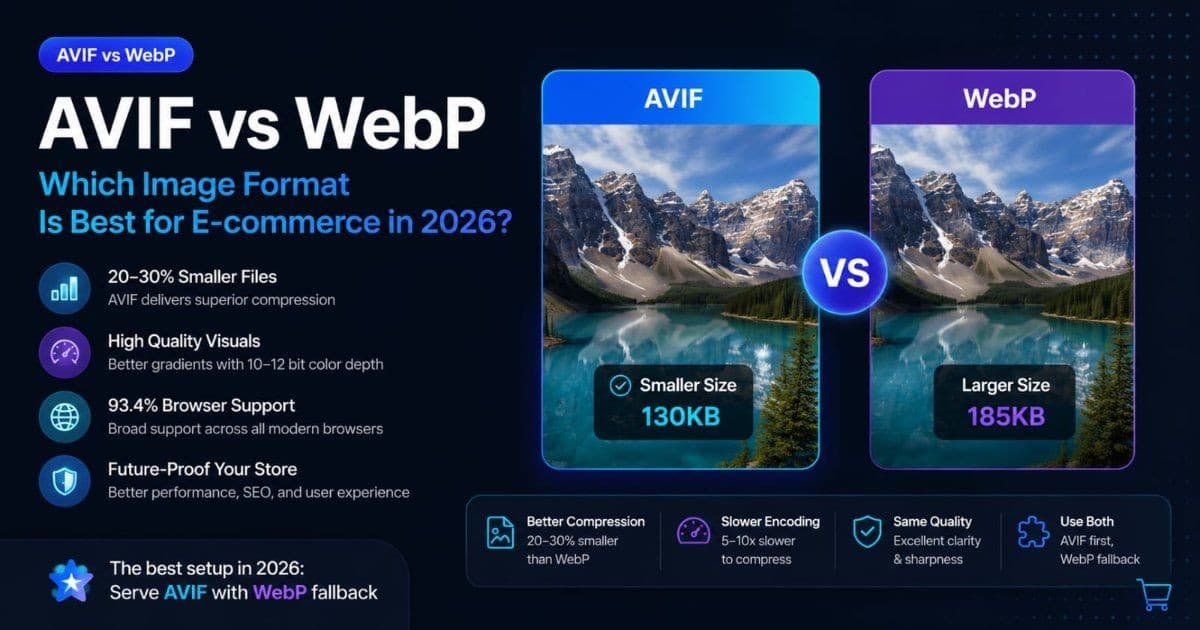
- AVIF produces files 20–30% smaller than WebP at equivalent visual quality, and roughly 50% smaller than JPEG (caniuse and 2026 benchmarks).
- AVIF's catch is encode speed. It's 5–10x slower to compress than WebP, which matters for large batch pipelines but stays invisible to shoppers when handled correctly.
- AVIF hit 93.4% global browser support in early 2026 (Safari since 16.4), so the correct 2026 setup is AVIF first with WebP as the automatic fallback, not one or the other.
AVIF vs WebP: The Quick Verdict
For e-commerce in 2026, serve AVIF with a WebP fallback where you control delivery. AVIF wins on file size by 20–30% and on gradient quality, while WebP wins on encode speed and slightly wider browser reach (roughly 96% vs 93.4% per caniuse). Both formats support XMP metadata, but metadata preservation depends on the delivery pipeline.
| Factor | AVIF | WebP | |--------|------|------| | File size (vs JPEG) | ~50% smaller | ~25–35% smaller | | File size (head-to-head) | 20–30% smaller than WebP | Baseline | | Encode speed | Slow (5–10x WebP) | Fast | | Decode speed | Fast (single-digit ms cost) | Fast | | Gradient / color quality | Excellent (10–12 bit) | Good (8 bit) | | Browser support (2026) | 93.4% | ~96% | | Transparency | ✅ Yes | ✅ Yes | | Animation | ✅ Yes | ✅ Yes | | XMP metadata | ✅ Yes | ✅ Yes |
The rest of this article explains where each of these differences actually matters for a store, and where they don't. Not every product page needs AVIF, and knowing the difference saves you real engineering effort.
What's Actually Different Between AVIF and WebP?
AVIF and WebP come from different lineages, and that heritage explains every practical difference between them. WebP, released by Google in 2010, is built on the VP8 video codec. AVIF, standardized in 2019, is built on AV1, a far newer codec developed by the Alliance for Open Media, whose members include Google, Netflix, Amazon, and Mozilla.
Newer codec, better compression. AV1 uses more sophisticated transform coding and larger prediction blocks than VP8, which lets AVIF pack the same visual information into fewer bytes. That's the entire source of AVIF's file-size advantage. It isn't a tuning trick; it's a generational jump in the underlying math.
AVIF also inherits AV1's support for high bit depth. WebP encodes 8 bits per color channel; AVIF handles 10 and 12 bit. In plain terms, AVIF can describe far more distinct shades, which is why it renders smooth gradients (a sky, a soft shadow, a glossy surface) without the visible banding WebP sometimes shows.
According to caniuse and corroborating 2026 benchmarks, AVIF delivers roughly 20–30% smaller files than WebP at matched quality, and about 50% smaller than JPEG. For an image-heavy category page, that compression gap is the whole reason to care about AVIF at all. Everything else comes down to what it costs you to capture it.
How Much Smaller Is AVIF Than WebP, Really?
AVIF files run 20–30% smaller than WebP at the same perceptual quality, measured by SSIM across multiple 2026 benchmark sets. On a real product page, that difference compounds fast: a single hero image saved as AVIF instead of WebP might drop from 185KB to roughly 130KB, and a page with a dozen images sheds hundreds of kilobytes before a shopper scrolls.
Here are representative sizes for the same source images exported at visually matched quality. Actual numbers vary with content, but the ratios hold across image types.
| Image | JPEG (85%) | WebP (80%) | AVIF (55–60%) | |-------|------------|------------|---------------| | Product photo 1200×1200 | 285KB | 185KB | 130KB | | Lifestyle shot 1920×1080 | 420KB | 265KB | 185KB | | Category thumbnail 400×400 | 45KB | 28KB | 19KB | | Transparent product cutout 800×800 | N/A | 96KB | 62KB |
Look at the WebP-to-AVIF column difference. On the product photo, AVIF saves about 55KB, roughly 30%. Multiply that across a 20-image product page and you're saving over a megabyte per page load. On high-traffic category pages, that translates directly into lower CDN bandwidth bills and a faster Largest Contentful Paint, since the hero image is almost always the LCP element.
The catch, and it's a real one, is that this saving isn't free. AVIF makes you pay for it in CPU time up front.
The Real Trade-Off: AVIF Encoding Is Slow
AVIF's one genuine weakness is encode speed. It compresses roughly 5–10x slower than WebP at default settings, and the gap widens further at high-effort quality settings. This isn't a rounding error. Where WebP might encode a product photo in a fraction of a second, AVIF at a comparable effort level can take several seconds per image, because AV1 spends far more CPU searching for the optimal way to pack each block.
Why does this matter for a store? If you're bulk-converting a catalog of 5,000 product images, the difference between "done in twenty minutes" and "done in three hours" is not academic. It shapes how you build the pipeline.
The good news is that decode speed, the part shoppers actually experience, is not the problem. Browsers decode AVIF efficiently, with only a single-digit-millisecond CPU cost over WebP that no user will ever perceive. The bottleneck lives entirely on the encoder side, in your build process, not on the customer's device.
Production systems solve this by encoding asynchronously, outside the page request. A tool or worker decodes the original source once, then runs the AVIF encoder in the background and caches the result. The shopper's browser is served a pre-built AVIF file instantly; nobody waits on the encoder. This is exactly how a batch tool like ImgSEO handles conversion. In our own Sharp-based processing pipeline, the AVIF pass runs noticeably slower than the WebP pass on the same source image, sometimes several times slower on large photos. But because that work happens server-side before you download the file, the shopper never feels it. The encode cost is real for whoever builds the images; it's simply not a page-speed penalty for the store.
Can You Actually Rely on AVIF in 2026?
Yes. AVIF reached 93.4% global browser support as of early 2026, according to caniuse. Every major browser renders it by default: Chrome, Edge, Firefox, Opera, Samsung Internet, and Safari since version 16.4 (which added both still and animated AVIF). That's roughly the same coverage WebP had a few years ago when stores started adopting it confidently.
The remaining ~6% is not random. It's concentrated in iOS 15 and older, a long tail of in-app browsers, and locked-down corporate Windows builds. For a store selling to North American, European, or East Asian shoppers on current devices, real-world AVIF incompatibility is well under that headline number.
Compare that to WebP, which sits near 96%, a small but real edge. The 3-point gap is exactly why you don't delete WebP when you adopt AVIF. WebP becomes the safety net for the visitors AVIF can't reach.
That's the core insight of the 2026 setup, and it's why the "versus" framing is a trap: this was never an either-or decision. The formats stack. AVIF serves the 93% who support it and captures the compression win; WebP catches the rest so nobody sees a broken image. The only real work is wiring up that fallback correctly.
How to Serve AVIF With a WebP Fallback
The cleanest way to serve both formats is the HTML <picture> element, which lets the browser pick the first format it understands. You list AVIF first, WebP second, and a JPEG as the final safety net. Browsers that support AVIF load it; the rest fall through to WebP or JPEG automatically, with zero JavaScript.
<picture>
  <source srcset="/products/blue-ceramic-mug.avif" type="image/avif" />
  <source srcset="/products/blue-ceramic-mug.webp" type="image/webp" />
  <img src="/products/blue-ceramic-mug.jpg" alt="Handmade blue ceramic coffee mug on oak table" width="1200" height="1200" />
</picture>
The browser evaluates the sources top to bottom and stops at the first type it can render. An iOS 15 visitor skips the AVIF source, skips WebP if needed, and lands on the JPEG: same layout, no broken image, no extra request. The width and height attributes prevent layout shift, protecting your Cumulative Layout Shift score.
If you'd rather not manage three files per image by hand, a content delivery network that negotiates formats does the same job server-side. It reads the browser's Accept header and returns AVIF, WebP, or JPEG from a single URL. Most modern e-commerce platforms and image CDNs support this out of the box, which is why platform choice changes how much of this you actually build yourself.
AVIF vs WebP by E-commerce Platform
Your platform decides how much fallback plumbing you touch. Some handle format negotiation for you; others hand you full control and full responsibility. Here's how the AVIF-vs-WebP decision plays out on each.
Shopify
Shopify can automatically deliver storefront images in modern formats such as AVIF or WebP based on browser support. Its documented direct product-image upload formats include WebP but do not currently list AVIF. Upload a supported high-quality source and let Shopify handle delivery, but do not rely on embedded metadata remaining intact in every transformed derivative.
WooCommerce
WooCommerce gives you complete control, which makes it the platform where AVIF pays off most directly, and where you own the fallback. Several image-optimization plugins generate AVIF and WebP variants on upload and serve them via <picture> or CDN negotiation. Combined with the broader WooCommerce image SEO practices in our full guide, this gives you the complete stack: AVIF for the compression win, WebP as fallback, and embedded metadata on both.
Etsy
Etsy is the outlier where neither modern format is the safe default. Etsy's upload and display pipeline is most reliable with JPEG, and even WebP can behave inconsistently in seller dashboards and previews. AVIF is not the format to experiment with here. For Etsy image SEO, stick with a well-compressed JPEG at 85% quality plus descriptive filenames and XMP metadata. The compression format matters far less than the metadata and filename signals inside Etsy's closed ecosystem.
Amazon
Amazon requires JPEG for main product images, so AVIF and WebP don't enter the decision for your primary listing photo. Amazon serves images through its own CDN, so you can't influence delivery format anyway. For Amazon product image SEO, your levers are image quality, the pure-white-background requirement, and a minimum 1000px longest side for zoom — not next-gen format adoption.
Which Should You Choose? A Simple Decision Framework
For a store running on a platform where you control delivery, the answer is almost always both. But the priority order depends on your situation. Work through these in order:
- Do you control image delivery (WooCommerce, custom storefront, CDN)? If yes, serve AVIF first with a WebP fallback. You capture the 20–30% saving for 93% of visitors and lose nothing for the rest.
- Are you on a platform that negotiates formats (Shopify)? Upload a high-quality source and let the platform serve AVIF or WebP per browser. Don't hand-manage variants.
- Are you on Etsy or Amazon? Format choice is largely made for you: JPEG. Spend your effort on filenames, alt text, and XMP metadata instead.
- Is your catalog huge and your pipeline manual? Adopt AVIF gradually. Convert your top-traffic product pages first, measure the LCP change in PageSpeed Insights, and let the encode-heavy migration run in the background over time.
- Do you sell products with subtle gradients such as jewelry, fashion, cosmetics, or glassware? Weight toward AVIF regardless. Its 10–12 bit color depth prevents the banding that makes premium product shots look cheap.
The honest summary: WebP remains the practical default because it's fast to produce and nearly universal, and AVIF is the upgrade you layer on top when you control delivery and care about the last 20–30% of file size. Neither replaces the other in 2026. They work as a pair.
For the deeper mechanics of compression settings and quality targets across all formats, our image compression guide for e-commerce walks through the full workflow.
FAQ
Is AVIF better than WebP for e-commerce?
For file size, yes — AVIF is 20–30% smaller than WebP at the same visual quality, per caniuse and multiple 2026 benchmarks. The trade-off is encode speed: AVIF is 5–10x slower to compress. For most stores the answer isn't one or the other but "serve both," with AVIF as the first choice and WebP as the automatic fallback.
What is the browser support for AVIF in 2026?
AVIF reached 93.4% global browser support as of early 2026 (caniuse). Every major browser renders it — Chrome, Edge, Firefox, Opera, Samsung Internet, and Safari since version 16.4. The remaining ~6% is mostly iOS 15 and older devices plus locked-down corporate browsers, which is exactly why a WebP fallback still matters.
Does AVIF look better than WebP?
Often, yes — especially on gradients. AVIF supports 10–12 bit color depth versus WebP's 8 bit, so it renders skies, shadows, and glossy surfaces without the banding WebP's VP8 heritage can introduce. For jewelry, fashion, and cosmetics, where subtle tonal shifts are part of the product's appeal, that quality edge is visible.
Why is AVIF encoding so slow?
AVIF is built on the AV1 video codec, which spends far more CPU searching for optimal compression than WebP's older VP8 does. At default settings AVIF encodes roughly 5–10x slower. In production this is handled by encoding asynchronously, outside the page request, so the slow part happens during processing and shoppers are served a finished file instantly.
Should I replace all my WebP images with AVIF?
No. Add AVIF as the first-choice source and keep WebP as the fallback rather than deleting it. A <picture> element or a format-negotiating CDN serves AVIF to the 93% of browsers that support it and WebP to everyone else. Deleting WebP would leave that remaining slice of visitors with no modern-format image.
Does AVIF or WebP help SEO more?
Both can improve Core Web Vitals by shrinking image payload, and AVIF's smaller files can produce a larger LCP gain on image-heavy pages. Both formats support XMP metadata, but Google does not document XMP or EXIF as standalone ranking factors.
Is WebP obsolete now?
Not at all. WebP is the reliable fallback layer beneath AVIF, still required for the ~6% of visitors without AVIF support, and it encodes far faster for high-volume batch pipelines. In 2026 WebP is the practical default and AVIF is the compression upgrade you layer on top — a pairing, not a replacement.
How do I add SEO metadata to AVIF and WebP files?
Both formats support XMP metadata for portable descriptive information. ImgSEO embeds XMP metadata automatically during conversion for supported exports, so titles, descriptions, and keywords can remain inside the exported file. Google does not document XMP as a standalone ranking factor. For manual embedding, ExifTool can write XMP to both AVIF and WebP files.
Conclusion
The AVIF-versus-WebP question has a cleaner answer in 2026 than it did a year ago, and the answer is rarely "pick one." AVIF wins decisively on file size, 20–30% smaller than WebP and around 50% smaller than JPEG, and on gradient quality thanks to its higher bit depth. WebP wins on encode speed and holds a slim browser-support edge at roughly 96% against AVIF's 93.4%. Those strengths are complementary, not competing.
So the modern setup layers them: AVIF as the first source for the 93% of browsers that support it, WebP as the fallback that guarantees every visitor gets a fast, modern image. The <picture> element or a format-negotiating CDN wires this up with no ongoing effort, and the one real cost, AVIF's slow encode, lives in your build pipeline and never reaches the shopper's screen.
The format affects how efficiently images load. Google recommends descriptive alt text, filenames, relevant page context, and crawlable images to help it understand image subject matter. Embedded XMP can carry portable descriptive information but does not guarantee rankings.
ImgSEO handles both halves at once: converting and compressing to WebP or AVIF while generating AI alt text and embedding XMP metadata in a single pass. ImgSEO accepts JPEG, PNG, WebP, and AVIF inputs, processes up to five images at a time, and exports optimized JPEG, WebP, or AVIF files ready for e-commerce use. Upload the format supported by your destination platform. For Shopify product-image uploads, use a documented format such as WebP or JPEG; Shopify may serve AVIF automatically but does not currently list AVIF for direct product-image upload. Try ImgSEO free and compare the before-and-after on your own product photos.