
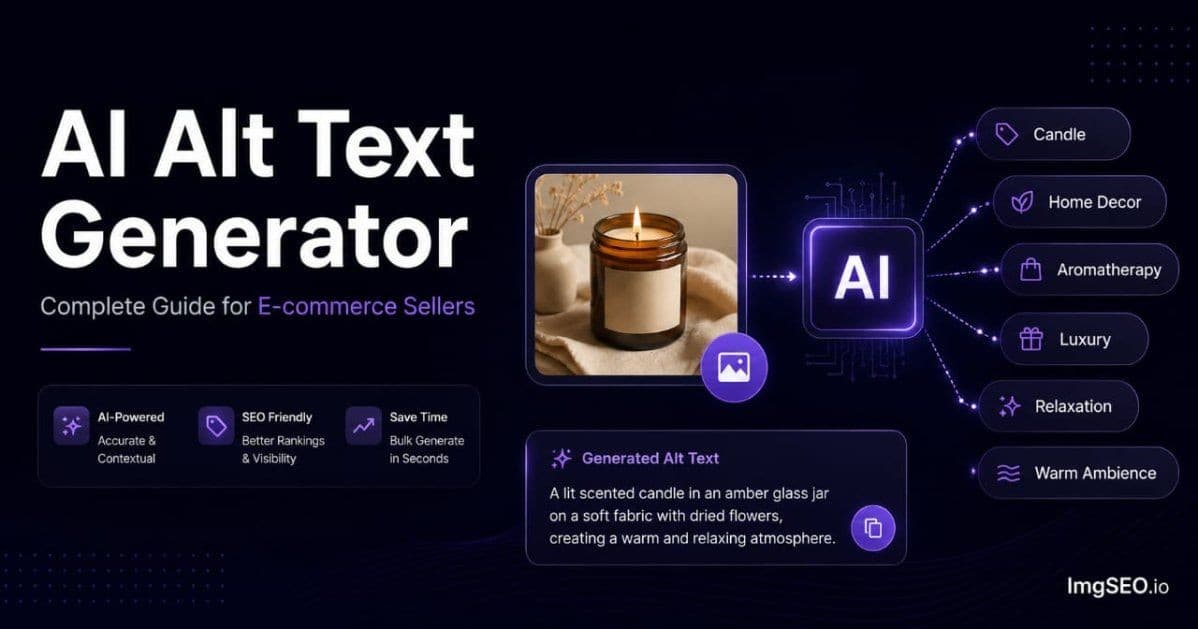
Writing alt text for 500 product images manually would take more than 25 hours. An AI alt text generator does the same work in under an hour — and produces better keyword coverage every time.
If you sell on Etsy or Shopify, alt text is one of the highest-leverage SEO actions you can take. Google Images is a significant traffic source for product searches, and alt text is its primary ranking signal. The problem is scale: most sellers have hundreds of images and no realistic way to write specific, keyword-rich alt text for all of them by hand.
That is exactly the problem an AI alt text generator solves.
This guide covers what an AI alt text generator is, how it works under the hood, what to look for when choosing one, how to use it for both Etsy and Shopify, and what kind of results to expect.
Key Takeaways
- Writing alt text for 500 product images manually takes more than 25 hours; an AI alt text generator does the same batch in under an hour.
- Manual alt text averages 4–6 keywords per image; AI-generated alt text averages 10–15, structured as material → product type → style → occasion → use case.
- ImgSEO's free tier covers 30 images with no credit card required. It generates alt text as a separate SEO output and embeds related descriptive metadata into supported image exports.
What Is an AI Alt Text Generator
Definition
An AI alt text generator is a tool that uses computer vision and artificial intelligence to analyze product images and automatically produce descriptive, SEO-optimized alt text.
The key word is analyze. It reads the actual image content — not the filename, not the product title, not any metadata you provide. It examines the pixels and identifies what it sees.
Output is natural language text that describes the image in a way search engines can index and rank. For a product image, that means material, type, style, color, occasion, and use case — the vocabulary buyers actually use when searching.
How It Differs from Manual Alt Text
When you write alt text manually, you look at your product image and type a description. The output depends entirely on your time, your keyword knowledge, and how much effort you put in on any given day.
An AI alt text generator takes a different path:
- Computer vision scans the image and identifies objects, materials, textures, and colors
- E-commerce AI layer maps those visual signals to buyer search vocabulary
- SEO structuring arranges keywords in a Google-readable format
- Output is ready in 5–10 seconds
The practical difference: manual alt text averages 4–6 keywords per image. AI-generated alt text averages 10–15 — which means more ranking opportunities for more search queries.
How It Differs from Generic Image Captioning
Generic image captioning tools describe what they see literally:
"A silver ring on a white background"
An e-commerce AI alt text generator trained on buyer search data produces something different:
"Sterling silver hammered band ring minimalist adjustable women everyday jewelry gift"
The difference is the training data. Generic captioning AI is trained to describe images accurately. E-commerce alt text AI is trained to describe images the way buyers search for them. Materials become material names. Styles become style keywords. Objects become product categories with purchase intent.
How AI Alt Text Generators Work
Step 1: Visual Analysis
When you upload a product image, the AI runs it through a computer vision model. This model was trained on millions of labeled images and learned to identify:
- Materials: silver, gold, ceramic, linen, soy wax, leather, wood
- Colors: not just "blue" but "dusty blue," "sage green," "cognac"
- Textures: hammered, speckled glaze, ribbed, brushed, raw edge
- Product type: ring vs bracelet vs earring, mug vs bowl vs vase
- Style signals: minimalist, rustic, maximalist, cottagecore, modern
Step 2: E-commerce Context Mapping
Visual data alone is not enough. The AI then maps what it sees to buyer vocabulary.
"Metallic sheen + thin circular band + small diameter" does not become "metal circle." It becomes "sterling silver minimalist band ring." The AI knows that buyers search for "sterling silver minimalist ring" and structures the output accordingly.
Platform matters here. Etsy buyers search with handmade signals and gift intent. Shopify buyers often search with product specifications and variant details. A well-built AI alt text generator adjusts its vocabulary based on which platform you are optimizing for.
Step 3: SEO Structure
The AI arranges identified keywords in a sequence that search engines process well:
Material → Product type → Style → Occasion → Use case
This is not arbitrary. It mirrors how Google parses image queries and how buyers phrase long-tail product searches. The structure maximizes the number of search queries the alt text can rank for without keyword stuffing.
Step 4: Output
Final output is 100–200 characters of natural language alt text ready to paste directly into your platform. ImgSEO keeps alt text as a separate SEO output and embeds related descriptive metadata into supported image exports.
For a deeper look at the technical process, see how AI generates alt text for product images.
Why E-commerce Sellers Need an AI Alt Text Generator
The Scale Problem
The average Etsy shop has 50 active listings. Each listing supports up to 10 images. That is 500 image slots — and most sellers leave all alt text fields empty because filling them manually is not realistic.
| Shop size | Images | Manual time | AI generator time | |---|---|---|---| | Small (20 listings) | 100 images | 4–5 hours | 15 minutes | | Medium (50 listings) | 250 images | 10+ hours | 30 minutes | | Large (150 listings) | 750 images | 30+ hours | 90 minutes | | Established (300+ listings) | 1,500+ images | 60+ hours | 3 hours |
AI does not just save time. It makes full catalog optimization possible for the first time.
The Quality Problem
When sellers do write alt text manually, they typically write generic descriptions:
- "product photo"
- "ring"
- "candle"
- "blue dress"
Generic alt text ranks for nothing specific on Google Images. It competes against millions of images using the same thin descriptions and wins none of them.
An AI alt text generator produces specific, keyword-rich descriptions every time — regardless of which image it is processing. Specificity is what earns Google Images rankings.
The Consistency Problem
Manual alt text quality degrades across a large catalog. You write excellent alt text for your first ten images. By image fifty, you are writing "ring" again because the detailed version takes too long. By image two hundred, you have stopped entirely.
AI maintains identical quality and structure across every image in your catalog. Your 500th image gets the same keyword coverage as your first.
For context on why consistent, keyword-rich alt text outperforms generic descriptions at scale, see why AI alt text beats generic descriptions.
What to Look for in an AI Alt Text Generator
Must-Have Features
Visual analysis (not template-based) The tool must read the actual image. If it generates alt text from your filename or product title, it is not an AI alt text generator — it is a template filler. The output will be as generic as the input.
E-commerce vocabulary General-purpose AI captioning knows "silver." E-commerce AI knows "sterling silver," "925 silver," "silver-tone," and "antique silver" — and knows which one applies based on what it sees. This distinction drives whether your images rank for specific buyer searches.
Platform optimization Etsy and Shopify buyers use different language. The best tools adjust keyword selection based on which platform you target.
Editable output You should always review and be able to modify AI-generated alt text before publishing. No AI is 100% accurate, and you have product-specific knowledge the AI does not.
Nice-to-Have Features
Batch processing: Upload multiple images at once instead of one at a time.
Metadata embedding: Writes related descriptive XMP metadata directly into JPEG, WebP, and AVIF exports, with EXIF additionally included for JPEG. Alt text remains a separate generated SEO output.
SEO title generation: Produces a keyword-rich product title alongside alt text, so one upload optimizes both fields.
Tag generation: For Etsy sellers, AI-generated tags that match the visual content are significantly more specific than manually brainstormed tags.
Red Flags to Avoid
- Generates alt text from filename or title only — no actual image reading
- Produces identical or near-identical output for different images
- No platform-specific vocabulary adjustment
- No option to review or edit before applying
- No information about how the AI was trained or what data it uses
AI Alt Text Generator vs Manual: Side by Side
Time Comparison
| Task | Manual | AI Generator | |---|---|---| | Single image | 2–3 min | 5–10 sec | | 50 images | 2–3 hours | 10 min | | 250 images | 10+ hours | 30 min | | 1,000 images | 40+ hours | 2 hours |
Quality Comparison
Product: Handmade ceramic mug
Manual average: "Handmade mug coffee ceramic"
AI generator: "Wheel thrown stoneware mug speckled glaze 12oz handmade artisan coffee morning gift pottery studio"
Product: Soy candle
Manual average: "Lavender candle soy wax"
AI generator: "Soy wax lavender candle 8oz clear glass jar wooden wick handmade natural aromatherapy relaxation gift women"
Product: Linen dress
Manual average: "Blue linen dress women"
AI generator: "Women's linen midi dress dusty blue minimalist casual summer sleeveless adjustable strap vacation beach resort"
Keyword Count
Manual alt text averages 4–6 keywords per image. AI-generated alt text averages 10–15. Each additional specific keyword is an additional search query your image can rank for. At 250 images, the difference compounds significantly.
For a detailed breakdown of ranking differences, see AI image SEO vs manual optimization.
How to Use an AI Alt Text Generator for Etsy
Step 1: Upload Your Product Images
Go to ImgSEO and upload up to five JPEG, PNG, WebP, or AVIF images per request.
Step 2: Select Platform
Choose Etsy from the platform selector. The AI adjusts its vocabulary:
- Handmade and artisan signals: "handmade," "hand-thrown," "hand-poured," "artisan"
- Gift intent keywords: "gift for her," "birthday gift," "unique gift"
- Craft and maker terminology: "small batch," "studio made," "one of a kind"
Step 3: Review AI Output
Before applying, check three things:
- Product type: Did the AI correctly identify what the product is? (Ring vs earring, mug vs bowl)
- Material: Is the material description accurate? ("sterling silver" vs "silver-tone" vs "stainless steel" matters for both accuracy and buyer trust)
- Missing details: Add any specifics the AI could not see — a size, a custom product name, a collection
Step 4: Apply to Etsy Listings
Two options:
Copy and paste: Take the AI-generated alt text and paste it into the "Describe this photo for buyers who are visually impaired" field on each Etsy listing image.
Download with embedded metadata: ImgSEO embeds XMP metadata directly into JPEG, WebP, and AVIF exports, with EXIF additionally included for JPEG. The generated alt text remains a separate SEO output for you to add to the relevant platform field.
Apply descriptive alt text to every relevant image slot — Etsy supports up to 20 photos per listing, and each photo can have its own text alternative.
For a full walkthrough of Etsy image SEO, see the Etsy SEO guide.
How to Use an AI Alt Text Generator for Shopify
Shopify Alt Text Field
Shopify stores alt text per image in the product media section:
- Go to Products in Shopify admin
- Open the product
- Click on any product image
- The alt text field appears on the right
For bulk editing, Shopify's admin export/import allows updating alt text across your catalog via CSV.
AI Output for Shopify
The AI adjusts vocabulary for Shopify's buyer context:
- Product specifications: dimensions, capacity, weight, material grade
- Variant signals: color, size, style names that match your store variants
- Technical keywords for product and collection page searches
The same product image generates different alt text for Etsy vs Shopify — because buyers on each platform use different search language.
Bulk Processing for Shopify
- Upload up to five product images per request to ImgSEO
- Download the optimized images with embedded metadata
- Upload to Shopify media library
- Apply alt text from the generated report to each product image
For a complete Shopify image SEO workflow, see the Shopify SEO guide.
The Google Images SEO Connection
Alt text is the primary signal Google uses to rank images in Google Images search results. It is how Google knows what your image shows when it cannot interpret pixels the way a human does.
When a buyer searches "sterling silver minimalist ring gift" on Google Images, Google returns images whose alt text contains those words. If your image says "ring," it does not appear. If your AI-generated alt text says "sterling silver minimalist adjustable band ring women gift," it competes for every combination of those keywords.
Expected Results Timeline
Results from alt text optimization are not instant — Google needs to recrawl and reindex your images.
| Timeframe | What happens | |---|---| | Week 1–2 | Google recrawls updated images and reads new alt text | | Week 3–4 | First Google Images impressions begin appearing in Search Console | | Month 2–3 | Clicks from Google Images start arriving | | Month 4–6 | Compound traffic as full catalog is indexed with optimized alt text |
The compound effect matters: each image in your catalog with strong alt text is an independent ranking opportunity. A 250-image catalog with optimized alt text across all images generates far more Google Images traffic than 10 perfectly optimized images.
For the full Google Images ranking strategy, see how to rank on Google Images.
Frequently Asked Questions
What is an AI alt text generator? An AI alt text generator uses computer vision and machine learning to automatically analyze product images and produce descriptive, keyword-rich alt text. It reads the image itself — materials, colors, style, product type — not just the filename or title.
Is AI-generated alt text good for SEO? Yes. AI-generated alt text consistently contains more relevant keywords than manual alt text because it systematically identifies every visual element present in the image. More specific keywords mean more Google Images ranking opportunities.
Can AI generate alt text for any product type? Most physical product categories used in e-commerce — jewelry, clothing, home goods, candles, art, ceramics, stationery — are well supported. Highly technical or specialized products may need manual review and editing, but the AI output still provides a strong starting point.
How accurate is AI at reading product images? Accuracy is high for well-lit product shots on neutral backgrounds. Material identification, product type, and color description are typically correct. Lifestyle shots with multiple elements may produce less precise output, which is why reviewing before publishing is important.
Does AI alt text work for Etsy SEO? Yes. Both Etsy's own search algorithm and Google Images (which drives external traffic to Etsy listings) use alt text as a ranking signal. AI generators tuned for Etsy include handmade signals, gift keywords, and craft terminology that align with how Etsy buyers search.
How long does an AI alt text generator take? 5–10 seconds per image. A batch of 250 images takes roughly 30 minutes. Manual alt text at 2–3 minutes per image would take over 10 hours for the same catalog.
Should I edit AI-generated alt text? Review it, but you rarely need to rewrite it completely. Verify the product type and material are correct, then add any specific details the AI could not infer visually. The AI handles 90% of the work; you add the product-specific 10%.
What is the best free AI alt text generator for e-commerce? ImgSEO is free for up to 30 images with no credit card required. It is built specifically for Etsy and Shopify sellers, generates alt text alongside SEO titles and tag suggestions, and embeds XMP metadata directly into JPEG, WebP, and AVIF exports, with EXIF additionally included for JPEG.
Conclusion
An AI alt text generator reads your product images and produces SEO-optimized descriptions automatically. No templates. No filename scraping. Actual visual analysis of what your product looks like.
The results are 10–15x faster than writing alt text manually, with equal or better keyword coverage. Manual alt text averages 4–6 keywords per image. AI-generated alt text averages 10–15 — each one an additional search query your images can rank for.
The sellers appearing on Google Images for competitive product searches are not leaving alt text fields empty. They have specific, keyword-rich descriptions on every image in their catalog. An AI alt text generator is the only realistic way to achieve that at scale.
ImgSEO works in three steps: upload your product image, the AI generates alt text, SEO title, and tag suggestions, then you download and apply. Free for 30 images — no credit card required.
For more on alt text strategy and image SEO, see the complete guide to alt text for e-commerce.


