Alt text is the single most impactful image SEO change you can make today — and most e-commerce sellers leave it completely empty. A study of over 1 million product pages found that more than 65% had no alt text at all on their product images. That is not just an SEO problem. It is free traffic sitting unclaimed while your competitors pick it up.
This guide explains exactly what alt text is, why it matters for both SEO and accessibility, how to write it well for every type of product image, and step-by-step instructions for adding it on Shopify, Etsy, WooCommerce, and Amazon. By the end you will have a repeatable system for every image you publish.
Key Takeaways
- More than 65% of product pages studied had zero alt text on their images — a study of over 1 million product pages found this gap, meaning most competitors haven't claimed this free traffic.
- Use the formula [Product type] + [key features] + [color/material] + [optional use case], and keep it 50–100 characters (125 max before screen readers truncate).
- Amazon is the exception: you cannot edit alt text directly — it auto-generates from your product title, so the title has to carry the descriptive weight instead.
What is Alt Text?
Definition
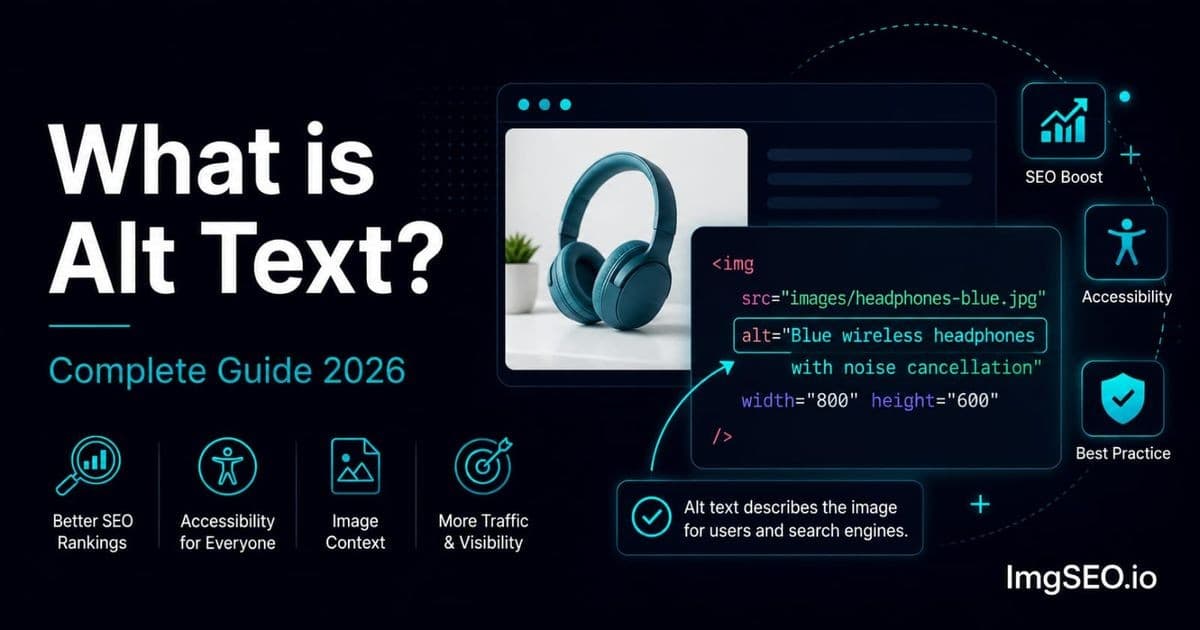
Alt text (short for "alternative text") is a written description attached to an image. It was invented to help people who cannot see images — visually impaired users whose screen readers read the alt text aloud instead of displaying the picture.
That original accessibility purpose has not gone away. But alt text is now also one of the clearest signals you can give Google about what your product image contains.
Google cannot look at a photo the way a human does. It reads text. When you write alt="Blue linen summer dress for women", you are telling Google's crawler exactly what is in that image, what product it represents, and which keywords it should associate with that page. When the alt text is empty, Google guesses — or ignores the image entirely.
Where Alt Text Lives
Alt text lives in the HTML of a page, inside the <img> tag:
<img src="blue-linen-summer-dress.jpg" alt="Blue linen summer dress for women">
You do not need to write HTML to add it. Every major e-commerce platform has a plain-text field in the product editor where you type the alt text and the platform generates that code for you automatically.
Alt text in HTML is separate from image metadata (EXIF and XMP data embedded inside the image file itself). Alt text is a page-level SEO element; embedded metadata carries file-level descriptive and rights information.
Why Alt Text Matters
For SEO
Google Images is a significant traffic source that most e-commerce sellers completely ignore. It handles roughly 23% of all web searches. Shoppers searching "blue linen summer dress" do not always click the Google Shopping tab first — many scroll through image results, click a product photo that catches their eye, and land directly on that product page.
Alt text is how your images qualify for those results. Google reads it to understand what the image shows, which search queries it is relevant for, and whether to rank it in image search. Strong alt text contributes to the overall keyword relevance of your page without being keyword stuffing — it is context, not repetition.
For Accessibility
Screen readers — software used by people with visual impairments — read alt text aloud when they reach an image on a page. Without it, the screen reader either announces the filename (IMG_4521.jpg is not helpful) or skips the image silently.
WCAG 2.1 accessibility guidelines require meaningful alt text on informative images. While enforcement varies by jurisdiction, accessibility compliance is increasingly important for e-commerce businesses, and many platforms are beginning to flag missing alt text as a listing quality issue.
For E-commerce Specifically
Traffic from Google Images has unusually high buying intent. Someone searching for "handmade ceramic coffee mug white" in Google Images is not browsing casually — they are looking for something to buy. That visitor, landing on your product page from an image search, converts at a higher rate than general organic traffic.
Alt text is also free. There is no ad spend, no link-building campaign, no technical infrastructure required. It is text in a field in your product editor. The only cost is the time it takes to write it.
Alt Text vs Image Title vs Image Description
Images have several text fields associated with them, and it is easy to confuse them. Here is how they compare:
| Element | Where | Purpose | SEO Impact | |---------|-------|---------|-----------| | Alt text | HTML attribute | Accessibility + SEO | ⭐⭐⭐⭐⭐ | | Image title | HTML attribute | Tooltip on hover | ⭐ | | Image description | CMS field | Admin notes | ⭐⭐ | | EXIF title | Embedded metadata | File metadata | ⭐⭐⭐ | | Filename | File name | URL signal | ⭐⭐⭐⭐ |
Alt text is the most important of these for SEO. The image title (the HTML title attribute) appears as a tooltip when a user hovers over an image in a desktop browser — Google gives it minimal weight. The image description field in your CMS is often only visible to site admins. EXIF and XMP can carry descriptive and rights-related information inside the image file, but they should not be treated as standalone ranking factors. For image SEO, prioritize useful alt text, descriptive filenames, relevant page context, crawlability, and appropriate image performance.
How to Write Perfect Alt Text
The Formula
The most reliable approach for product images is this pattern:
[Product type] + [key features] + [color/material] + [optional: use case or size]
That structure captures what Google needs: what the product is, what makes it distinctive, and a natural keyword phrase a shopper might search.
Examples:
Blue linen summer dress for womenHandmade ceramic coffee mug 12oz in whiteMen's black leather Oxford dress shoes14k gold round-cut diamond engagement ringLavender soy wax scented candle 8oz in glass jar
Good vs Bad Examples
| Bad Alt Text | Good Alt Text |
|-------------|--------------|
| image1 | Blue linen summer dress for women |
| product | Handmade ceramic coffee mug 12oz white |
| shoes | Men's black leather Oxford dress shoes size 10 |
| ring | 14k gold diamond engagement ring round cut |
| (empty) | Lavender soy wax scented candle 8oz in glass jar |
The bad examples tell Google nothing. The good examples describe a real product in words a shopper would actually search.
Rules for Writing Alt Text
- Describe what you actually see in the image. Do not write what you wish were in the image, or a marketing headline. Describe the product visually.
- Include your primary keyword naturally. Write the description first, then check that your keyword appears. If it does not fit naturally, rework the description — do not force it.
- Keep it under 125 characters. Screen readers typically truncate at that length. Most good product alt text lands between 50 and 100 characters.
- Do not start with "image of" or "photo of". Screen readers already announce "image" before reading the alt text. Starting with it creates redundancy: "Image: image of blue dress."
- Do not keyword stuff.
blue dress blue summer dress women's blue linen dressis spam. Google recognises it and it degrades your standing. - Each image should have unique alt text. If every image on your product page has the same alt text, you lose the opportunity to add context for each view, and Google may treat the duplicates as lower quality.
- Empty alt text (
alt="") is correct only for decorative images. A background texture, a divider line, or a purely decorative icon that conveys no product information should use an empty alt attribute — that tells screen readers to skip it. Never leave alt text absent entirely on a product image.
What NOT to Include
- Your shop name or brand name (unless it is part of what is pictured)
- Promotional text: "Buy now!", "Best seller", "50% off this week"
- Duplicate phrasing from other images on the same page
- Lists of keywords separated by commas or pipes
Alt Text for Different Image Types
Most product listings include several image types. Each one should have alt text written specifically for what that image shows.
Main Product Image
The primary photo is usually the product against a clean background. Focus on product type, key features, and color or material.
Example: Handwoven wool throw blanket in rust orange 50x60 inches
Lifestyle or Context Image
A lifestyle photo shows the product in use or in a setting. Describe the scene, the product, and how they relate.
Example: Woman wearing white linen blouse at outdoor cafe in summer
Detail or Close-Up Image
Close-ups show texture, stitching, hardware, or other fine details. Focus the alt text on that specific detail.
Example: Close-up of hand-stitched leather edge on brown bifold wallet
Size Reference Image
When you photograph a product next to a familiar object to show scale, include that reference in the alt text.
Example: Small ceramic succulent pot next to US quarter coin for size reference
Variant Images (Different Colors or Sizes)
If you have separate images for each color variant, change only the descriptor that differs. Do not reuse the same alt text across all variants.
Example for one variant: Merino wool crew-neck sweater in forest green
Example for another: Merino wool crew-neck sweater in dusty rose
How to Add Alt Text on Each Platform
Shopify
- Go to Products in your Shopify admin and select the product.
- Click on a product image to open the image editing panel.
- Find the "Image alt text" field below the image.
- Type your descriptive alt text.
- Click Done, then save the product.
Shopify also lets you bulk-edit images through the Products list — useful when you have a large catalogue to work through.
Etsy
- Go to Shop Manager → Listings and open the listing you want to edit.
- Click on any listing image.
- Find the "Describe this photo for buyers who can't see it" field (Etsy's label for alt text, with a 500-character limit).
- Write your description and click save.
- Repeat for each image in the listing, then save the full listing.
Etsy surfaces listings with complete alt text more prominently in their own search results in addition to the Google Image SEO benefit.
WooCommerce
- Go to Products → Edit product in your WordPress admin.
- Click the main product image or scroll to the product gallery.
- Clicking any image opens the WordPress media popup.
- Find the "Alternative Text" field in the right-hand panel of the media popup.
- Add your alt text and click Update to save the media item.
- Update the product.
WooCommerce stores the alt text in WordPress's media library, so if you use an image across multiple products you will need to update it in the media library and verify it appears correctly on each product page.
Amazon
Amazon automatically generates alt text for product images based on your product title. You cannot edit it directly. The practical implication is that your product title needs to do the work: include the key descriptors (product type, material, color, size) in the title, and Amazon's auto-generated alt text will reflect them. For a deeper look at Amazon-specific optimisation, see our guide to Amazon product image SEO.
Alt Text and Metadata: The Power Combination
Alt text lives in the HTML on your page — it is added by your platform and served to Google when it crawls your site. Image metadata (EXIF and XMP data) lives inside the image file itself. These are two separate places where text descriptions of your image can exist.
Using both keeps a page-level description and descriptive information inside the exported file. Search engines and destination platforms determine whether embedded metadata is preserved or used.
For a full explanation of how image metadata works and what it stores, see our guide on what EXIF metadata is and why it matters for SEO.
ImgSEO generates AI-powered alt text suggestions for each of your product images and simultaneously embeds matching metadata into the image file — so you get both signals from a single workflow. If you are manually writing alt text for hundreds of product images right now, that combination cuts the process to a fraction of the time.
Common Alt Text Mistakes
Most alt text problems fall into one of these seven categories:
- Leaving alt text empty. The most common mistake by far. Empty alt text means Google cannot read the image, and screen readers get no information about the product.
- Using the same alt text for every image on a product page. Each image shows something different. The alt text should reflect that.
- Starting with "image of" or "photo of". These phrases waste your character limit and create a redundant screen-reader announcement.
- Keyword stuffing. Writing
blue dress women blue summer dress women's dress blue linendoes not help — it signals to Google that you are gaming the system and can reduce your page's quality score. - Too short. A single word like
dressorshoesgives Google almost no signal. Use the full formula. - Too long. Alt text over 125 characters gets truncated by screen readers, and the extra length does not add meaningful SEO value. Describe clearly and concisely.
- Promotional text instead of a description.
Best-selling summer dress — shop now!describes nothing about the image. Google Images ranks images by relevance to search queries, not by how compelling your call to action is.
Alt Text SEO Checklist
Before publishing any product listing, run through this checklist for every image:
- ✅ Every product image has alt text — no empty fields
- ✅ Alt text describes what is visually in the image
- ✅ Primary keyword is included naturally (not forced)
- ✅ Under 125 characters
- ✅ No keyword stuffing or repeated phrases
- ✅ Does not start with "image of" or "photo of"
- ✅ Each image has unique alt text — variants are differentiated
- ✅ Image metadata (EXIF/XMP) added when file-level descriptive or rights information is useful
Frequently Asked Questions
What is alt text in simple terms? Alt text is a short written description of an image. It tells search engines and screen readers what the image shows. For product images, it typically names the product, its key features, and its color or material.
Does alt text help SEO? Yes — it is one of the most direct SEO signals you can provide for an image. Google cannot visually interpret photos the way a human does. Alt text tells it what the image contains, which search queries it is relevant for, and whether to include it in Google Image results.
How long should alt text be? Aim for 50–100 characters. The practical maximum before screen readers truncate the text is 125 characters. Most complete product descriptions fit comfortably within that limit.
Should I include keywords in alt text? Yes, but only if they fit naturally in a description. Write the description first, then check that your keyword appears. Do not reverse the process by starting with a keyword list and building a description around it — the result is usually awkward and over-optimised.
What happens if I leave alt text empty? Google cannot determine what the image shows, so it is unlikely to rank that image in Google Images search results. Screen readers will announce the filename instead of a description, creating a poor experience for visually impaired shoppers. Empty alt text is one of the easiest SEO improvements to make and one of the most frequently overlooked.
Is alt text the same as an image description?
In everyday language the terms are often used interchangeably. Technically, alt text is the alt attribute in HTML — a short description used for SEO and screen readers. An "image description" may refer to a longer CMS field used for admin notes or captions. The alt text field is the one that matters most for search.
Do I need alt text on every image?
Every informative image — product photos, lifestyle images, close-ups — should have alt text. Purely decorative images (background patterns, spacers, icon flourishes) should use an empty alt attribute (alt="") so screen readers skip them correctly.
How is alt text different from an image title?
The image title is a separate HTML attribute (title="...") that appears as a tooltip when a user hovers over an image with a mouse. Google gives it very little SEO weight. Focus your effort on alt text.
Conclusion
Alt text is free, fast, and high-impact. You do not need a developer, a new tool subscription, or an SEO agency. You need a text field in your product editor and a consistent approach.
Start with your top 10 best-selling products today. Write alt text for every image using the formula — product type, key features, color or material. Then work through your catalogue in batches. Pair useful alt text with descriptive filenames, relevant page context, crawlable images, and appropriate image performance. Embedded EXIF/XMP metadata can separately carry descriptive and rights-related information inside the file.
If you want to skip the manual process, ImgSEO uses AI to generate optimised alt text and embed matching metadata for all your product images automatically. Try it free for up to 30 images — no credit card required.
For a broader introduction to image SEO across all e-commerce platforms, see our image SEO for beginners guide.