You're in one of the most competitive marketplaces on earth. Every category on Shopee has dozens, often hundreds, of near-identical listings competing for the same search term, and most of them are fighting on price alone. The sellers pulling ahead aren't necessarily cheaper — they're the ones whose photos get tapped first in a feed where a buyer decides in under a second whether to even look closer.
Shopee runs on two discovery surfaces at once: a conventional keyword search and an algorithmic Discover feed that behaves more like a social app than a marketplace. Both read your images as ranking and conversion signals, and both feed the same Shopee Ads system — meaning a weak cover photo doesn't just cost you organic clicks, it costs you money on every ad impression built from that same image.
This guide covers how Shopee's search and Discover feed actually treat images, the tested 9-photo-plus-video sequence, the local market adaptations that matter across Southeast Asia and Brazil, and the mistakes that quietly cap otherwise solid listings.
Key Takeaways
- Shopee's cover image doubles as your organic listing thumbnail and your default Shopee Ads creative — a weak cover photo costs you twice, in both free reach and paid ad spend.
- Use the full 9-image allowance plus the video slot: white-background cover, lifestyle/in-use shot, feature callouts, size chart, variant grid, and packaging or certification photos where relevant.
- Small factual feature callouts on images are generally fine; promotional or pricing text risks ad rejection under Shopee's content policy.
- Local market adaptation — model representation, styling, visible certifications like halal marks for Malaysia and Indonesia — measurably changes conversion across Shopee's SG/MY/ID/TH/PH/VN/TW/BR markets.
- Variant images need to be consistent with each other and with the cover — Shopee's variant picker displays them directly, and a mismatched set reads as sloppy or unreliable.
Why Shopee Image SEO Is Its Own Beast
Shopee is overwhelmingly mobile, with the large majority of browsing and purchasing happening on a phone rather than desktop, which changes what a good product photo even looks like compared to a desktop-first marketplace. A photo that reads clearly on a 6-inch screen at thumbnail size is a different design problem than one meant for a full-width desktop listing page.
Layered on top of that mobile-first reality is genuinely hyper-competitive category density — Shopee operates across Singapore, Malaysia, Indonesia, Thailand, the Philippines, Vietnam, Taiwan, and Brazil, and most popular categories carry enormous numbers of nearly identical listings. The Discover feed adds a second, algorithmic discovery layer alongside conventional search, and the Shopee Ads system sits on top of both, penalizing low-click-through creative directly in ad cost. Add in real market-by-market variation in what actually converts, and you get a platform where image strategy can't be copy-pasted from Amazon or eBay.
How Shopee Search Actually Ranks Listings
Shopee's ranking model weighs keyword match in the title heavily, alongside category placement, listing variations, price competitiveness within the category, shop rating, and engagement signals — click-through rate, add-to-cart rate, and conversion rate. Preferred Seller and Shopee Mall status layer additional ranking weight on top for sellers who qualify.
Images plug into this system primarily through engagement: once a listing is surfaced by its keyword and pricing signals, whether it gets clicked becomes a direct input feeding back into future placement. A well-titled, competitively priced listing with a weak cover photo still underperforms an equally well-optimized listing with a stronger image, because the click-through gap compounds over every impression the algorithm gives it.
Cover Image Requirements: The Non-Negotiables
Shopee's technical requirements are specific enough to get wrong by accident: a 1:1 square crop, a minimum resolution around 1000×1000 pixels, and a strong platform-wide preference for a white or light background. The product itself should fill roughly 80% or more of the frame — a small, distant product shot loses to a filled-frame competitor at thumbnail size every time.
Text overlays that read as promotional — "SALE," discount percentages, contact information — sit in genuinely risky territory under Shopee's ad content policy and can get an image or its paid promotion flagged. Keep the cover image itself clean and let your title and listing fields carry the promotional message instead.
The Text Overlay Grey Area: What's Actually Safe
Some sellers add small feature callouts directly on their images and rank and advertise without issue, while others get flagged for what looks like similar treatment. The distinction that actually matters is factual versus promotional: a label noting "500ml capacity" or "genuine leather" sits in safer territory than anything resembling a discount badge, urgency language, or contact details.
The safe pattern keeps overlay text minimal, factual, and clearly secondary to the product photo itself — not covering the product, not competing with it visually, and never substituting for information that belongs in the title or description fields instead.
The 9-Image Strategy: Building Out the Full Sequence
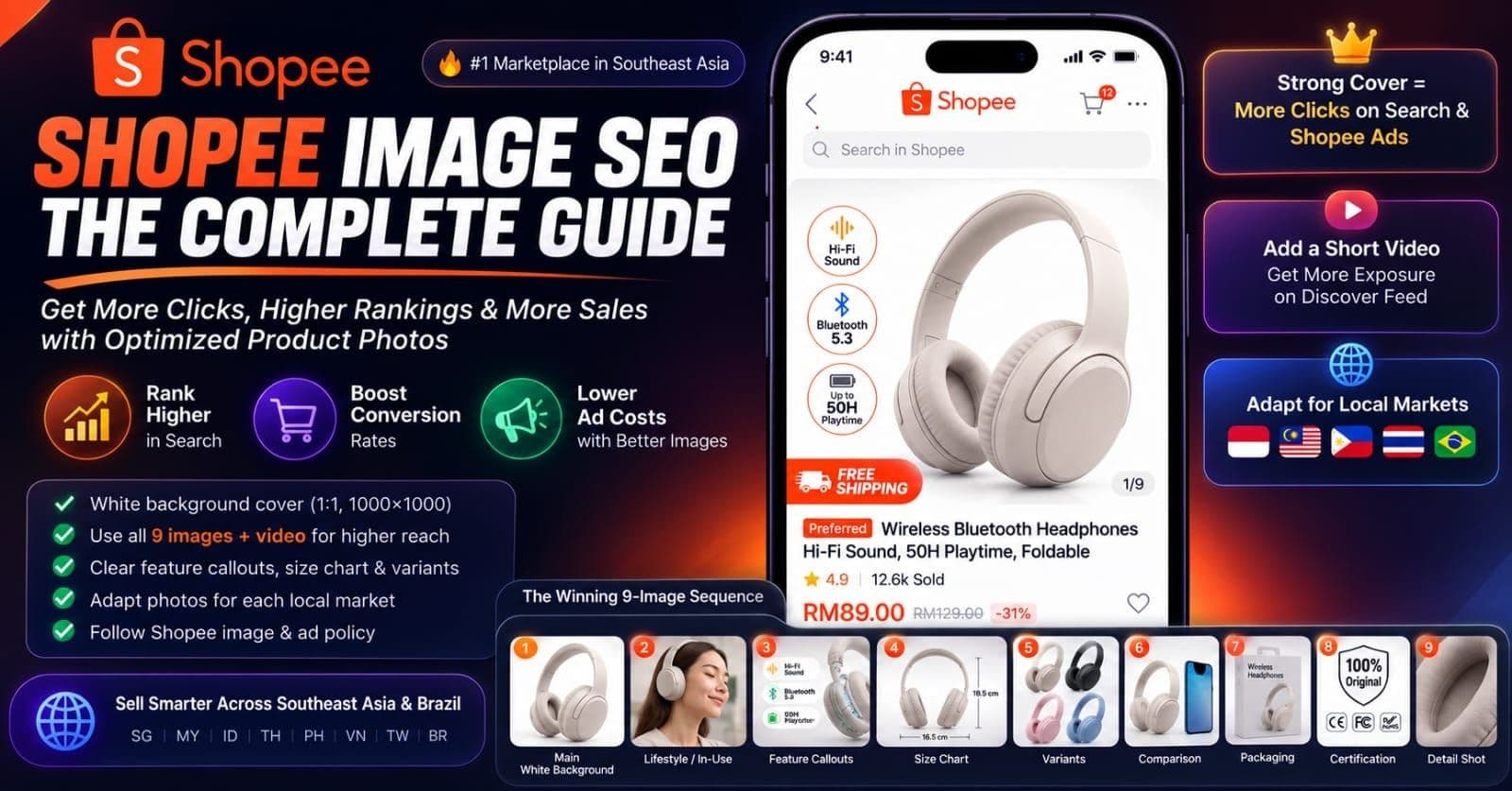
Shopee allows up to 9 images per listing, and sellers who use the full range consistently outperform ones stopping at 2 or 3, since each additional slot answers a question that would otherwise cost you a message or a lost sale. Here's the sequence that holds up across most categories:
| Slot | Purpose | |---|---| | 1. Main white-background shot | The cover — the image doing double duty as organic thumbnail and default ad creative | | 2. Lifestyle or in-use shot | Shows the product in real context, answering "what does this actually look like in use" | | 3. Feature callouts | Factual labels highlighting specs, materials, or capacity | | 4. Size or dimension chart | Especially critical for fashion, footwear, and anything sized | | 5. Variant options laid out | All color or style variants shown together for quick comparison | | 6. Comparison graphic | Useful for showing size relative to a common object, or before/after for consumables | | 7. Packaging | What actually arrives — reduces "not as pictured" disputes | | 8. Certification or authenticity | Relevant for beauty, food, and anything with halal, safety, or authenticity marks | | 9. Additional angle or detail | Whatever remaining question your specific category still leaves open |
Not every listing needs all 9 filled with equally distinct content, but categories with real sizing or authenticity concerns benefit most from using the full range rather than treating slots 6 through 9 as optional.
Video Listings: The Discover Feed's Biggest Lever
Shopee's video slot autoplays as vertical, short-form content inside the Discover feed, and listings using it get meaningfully more exposure there simply because there's more surface area for the algorithm to promote. A short clip — a few seconds to well under a minute — built for vertical mobile viewing outperforms a horizontal video awkwardly cropped to fit.
What you show in the first few seconds matters more than anything later in the clip, since that's the window where a scrolling viewer decides whether to keep watching or swipe past. Lead with the product itself in motion or in use, not a logo screen or a slow intro — Discover feed viewers have already scrolled past dozens of clips by the time yours plays.
Variant Images: Consistency the Picker Actually Displays
Shopee's variant picker shows a distinct image per color or size option directly in the buyer's selection interface, which means each variant photo needs to hold the same quality and framing standard as your cover — buyers see these side by side while deciding, not buried deep in a gallery.
Inconsistent variant photos — one shot on white, another with a shadow, a third at a different angle — read as a sloppier operation even when the underlying product quality is identical. Shoot all variants in one session with the same lighting and framing setup specifically to avoid this.
Category-Specific Patterns That Actually Convert
Different categories reward different photo compositions, and matching yours to category norms measurably improves click-through:
- Fashion performs best with an on-model shot paired with a flat lay and a clear size chart — buyers need fit information a product-only photo can't provide.
- Beauty benefits from a clean product shot alongside a swatch photo and, where relevant, a before/after comparison.
- Electronics do well with multiple angle shots, factual spec callouts, and an in-use photo showing scale and context.
- Home and kitchen items convert better with an in-use shot and a scale reference — a hand or common object in frame — since dimensions are hard to judge from a product-only photo.
- Food listings need a styled appetizing shot, a clear packaging photo, and a legible ingredient label — the ingredient label specifically reduces pre-purchase questions and disputes.
Local Market Adaptation: What Converts Differs by Country
What performs in Indonesia doesn't automatically perform in Thailand or Vietnam, and Shopee's own market spread across SG, MY, ID, TH, PH, VN, TW, and BR makes this a real strategic consideration rather than an afterthought. Model representation and styling that matches local aesthetic expectations shift conversion meaningfully — a styling choice that reads as premium in one market can read as generic or mismatched in another.
Cultural cues matter directly in specific markets: visible halal certification is a real trust signal worth showing clearly for Malaysia and Indonesia listings in relevant categories, and showing local currency or familiar measurement units in size charts removes a small but real friction point for buyers comparing your listing to local alternatives.
Shopee Live and Discover: Images vs Short Video
Organic listings surface in Discover through a mix of engagement history and shopability signals — how easily a viewer can act on what they're seeing, whether that's tapping through to a listing or adding to cart directly from the feed. Video generally outperforms static images here simply because the feed format itself is built around short-form video consumption first.
That doesn't make static images irrelevant in Discover — a strong cover photo still matters for the listings that do surface as images — but sellers investing in even simple, well-shot short video get a real placement advantage over photo-only competitors in this specific surface.
Shopee Ads: Why Cover Image Quality Has a Double Effect
Shopee's ads platform uses your existing product images as ad creative by default, which means a low-click-through cover photo doesn't just underperform organically — it also underperforms as paid creative, and that low ad CTR can bleed back into how the platform evaluates your listing's overall quality signals.
This double effect is easy to miss if you're treating your organic listing photos and your ad strategy as separate problems. They're not. Fixing your cover image once improves both surfaces simultaneously, and testing a new cover photo is genuinely one of the highest-leverage single edits available to a struggling listing.
Preferred Seller and Mall Requirements
Qualifying for Preferred Seller or Shopee Mall status comes with image quality thresholds and banner or logo presentation standards beyond what a standard seller account requires, and meeting them unlocks a real ranking boost on top of the badge itself. Sellers aiming for either status should audit their existing image library against current requirements before applying, since a rejected application often comes down to image quality rather than any other qualifying metric.
Copyright and Stock Photo Policy: Stricter Than eBay
Shopee enforces copyright and stock photo policy more strictly than some other marketplaces, which matters directly for dropshippers relying on supplier-provided images. Using a supplier's stock photos without adaptation or rights carries real takedown risk, and removing another brand's watermark or logo from a photo before using it is a policy violation, not a gray area.
Original photography, even simple and unstyled, protects you from this risk entirely and tends to convert better besides — buyers on a hyper-competitive platform increasingly recognize recycled supplier stock photos and treat them as a lower-trust signal.
Cross-Marketplace: What Carries Over to Lazada or TikTok Shop
Your white-background cover shot and core product photos generally transfer well to Lazada, since both platforms reward the same clean, accurate-representation style rather than a styled aesthetic. TikTok Shop SEA is a different case — its feed-native, short-video-first culture rewards content that looks native to the platform rather than a repurposed marketplace photo, so video especially tends to need a genuine reshoot rather than a straight port.
The metadata layer — title structure, category mapping, variant setup — rarely transfers cleanly regardless of platform, since each marketplace's search and ad systems read these fields differently. For the broader picture on how these platform-specific expectations compare to a hyper-competitive resale market with its own conventions, see Depop Image SEO and Poshmark Image SEO — different marketplace, same underlying principle that photo strategy has to match the platform it's built for.
Off-Shopee SEO: Google Indexing and the Social Funnel
Individual Shopee listings get indexed by Google inconsistently, and what tends to surface in general web search is usually a shop page rather than a specific item — a more limited footprint than platforms with heavier individual-listing indexing. That makes your linked Instagram or TikTok presence a real strategic layer for driving discovery Shopee's own limited Google footprint can't provide on its own.
Content posted on those channels — styled photos, short demo videos, restock announcements — gets discovered and indexed the way individual Shopee listings mostly don't, functioning as a funnel into your Shopee shop rather than a separate, disconnected marketing effort.
Common Mistakes That Cap Otherwise Solid Listings
A handful of recurring mistakes account for most of the "good product, weak reach" pattern on Shopee:
- Uploading rectangular photos and letting Shopee auto-crop them. The platform's automatic square crop rarely centers the product the way a deliberate 1:1 shot does — crop for square yourself before uploading.
- Promotional text triggering ad rejection. Discount badges and urgency language on the image itself risk flagging both the listing and its paid promotion.
- Ignoring variant images. Leaving variant slots blank or inconsistent costs conversion at the exact moment — the variant picker — a buyer is deciding to purchase.
- Cluttered lifestyle-only cover photos. A busy scene competes with the product for attention; a clean white-background cover consistently outperforms in feed contexts.
- Unadapted stock photos in a specific local market. A generic supplier photo that doesn't reflect local styling, model representation, or relevant certifications underperforms a modest original shot built for that specific market.
Measuring What's Actually Working
Shopee's Business Insights dashboard shows impressions, click-through rate, and conversion by listing — the most direct way to confirm whether a specific cover photo is actually earning clicks rather than just existing. Checking this regularly, rather than assuming a listing "should" be performing based on product quality alone, catches a weak cover photo before it costs weeks of buried impressions.
The most useful test isn't a one-off glance at a single listing's numbers — it's duplicating a listing or editing the cover image directly and comparing CTR over a matched time window before and after. Sellers who run this comparison consistently learn far more about what their specific category and market respond to than any general styling rule can tell them on its own.
Getting the Fundamentals Right Before You Shoot
Everything above assumes a clean, properly sized, technically sound source image — the file itself, not just the composition choices layered on top. Sellers managing inventory across Shopee, Lazada, and their own storefront benefit from keeping image files consistently processed rather than fixing sizing and metadata one platform at a time. ImgSEO handles that layer for sellers scaling a catalog across multiple Southeast Asian marketplaces. For the underlying alt text principles wherever you do need them — your own site, a cross-listed storefront — see How to Write Alt Text for Product Images, and for the platform requirements a more Amazon-style marketplace enforces by comparison, see Amazon Product Image Requirements.
Frequently Asked Questions
Does Shopee compress my photos? Yes. Shopee automatically compresses and resizes uploaded images to fit its display and bandwidth requirements across every market it serves, which matters given how much of its traffic comes from lower-bandwidth mobile connections. You can't disable this, so uploading a properly sized, already-compressed source file gives the platform's pipeline better raw material than an oversized original.
Can I use the same photo on Shopee and Lazada? Your white-background cover shot and detail photos generally transfer well between Shopee and Lazada, since both platforms favor the same clean, accurate-representation style. What doesn't transfer automatically is variant setup, size chart formatting, and any promotional text overlay — each platform's ad policy and image-text rules differ enough that a graphic built for one can get flagged or look out of place on the other.
Does Shopee allow text on product images? In a limited way. Small, factual feature callouts (material, capacity, dimensions) are generally tolerated, but promotional or pricing text — words like discount percentages, contact numbers, or urgency language — falls under Shopee's ad content restrictions and can get an image or its paid promotion rejected. The safer pattern keeps text factual and minimal, not promotional.
How many photos can I upload per Shopee listing? Shopee allows up to 9 images per listing, plus a separate short video slot. Sellers who use the full range — a white-background cover, a lifestyle shot, feature callouts, a size or dimension chart, and variant photos — consistently answer more pre-purchase questions than listings stopping at 2 or 3 images.
Does adding a product video actually help on Shopee? Yes, particularly for Discover feed placement. Shopee's Discover feed autoplays short vertical video, and listings with video get meaningfully more exposure there than photo-only listings, since there's simply more surface area for the feed to promote. A short, vertical clip showing the product in the first few seconds is worth the extra shoot time for most categories.
Conclusion
Shopee doesn't reward the cheapest listing in a hyper-competitive category — it rewards the one whose photos earn a tap in half a second of feed scrolling, then hold up under a closer look. Your cover image is doing more work here than on most marketplaces, since it's simultaneously your organic thumbnail and your default paid ad creative.
Start with a clean, square, white-background cover filling most of the frame. Build out the remaining 8 slots with intent — lifestyle context, feature callouts, size charts, consistent variant photos — and adapt your styling to the specific market you're actually selling into rather than assuming one photo set works everywhere Shopee operates. Check Business Insights regularly rather than guessing at what's working, and treat a weak cover photo as the single highest-leverage fix available to a stalled listing.
For the fuller picture of how image SEO works across marketplaces beyond Shopee specifically, see the Image SEO Guide.