If your Amazon listings keep getting suppressed, or your main image looks flat next to competitors, the cause is almost always the image rules. Amazon enforces stricter photo standards than any other major marketplace, and it hides listings that break them.
This guide is the compliance reference. You'll get the exact rules for the main and gallery images, the technical specs, and the category exceptions. You'll also get the fix workflow for when a listing gets suppressed. For the ranking and conversion side, pair it with our Amazon product image SEO guide.
Key Takeaways
- The main image must be a pure white background (RGB 255, 255, 255), product-only, with no text, props, or logos — per Amazon's current guidelines.
- Secondary slots are where you sell: lifestyle, infographics, size charts, and comparison images are all allowed there.
- Amazon gives you no alt text field for gallery images and rewrites your filenames. Your own website is where image SEO actually pays off.
Numeric rules below reflect Amazon's published standards, which change from time to time. Always confirm the current figures in Seller Central before a big upload.
Why Amazon suppresses listings over images
Amazon suppresses a listing when its main image fails an automated check. The usual triggers: a non-white background, a product too small in the frame, or text and logos on the main photo. A suppressed listing still exists, but it's hidden from search until you upload a compliant image.
Suppression is silent. You won't get a loud alert. The listing simply stops appearing for its keywords, and sales drop with no obvious cause.
The fastest way to catch it: check the Manage Inventory page for a "Suppressed" or "Search Suppressed" status. Amazon lists the exact reason there. Image violations are among the most common triggers. They're also the fastest to fix: re-shoot or re-edit one photo, re-upload, and the listing returns.
Amazon main image requirements
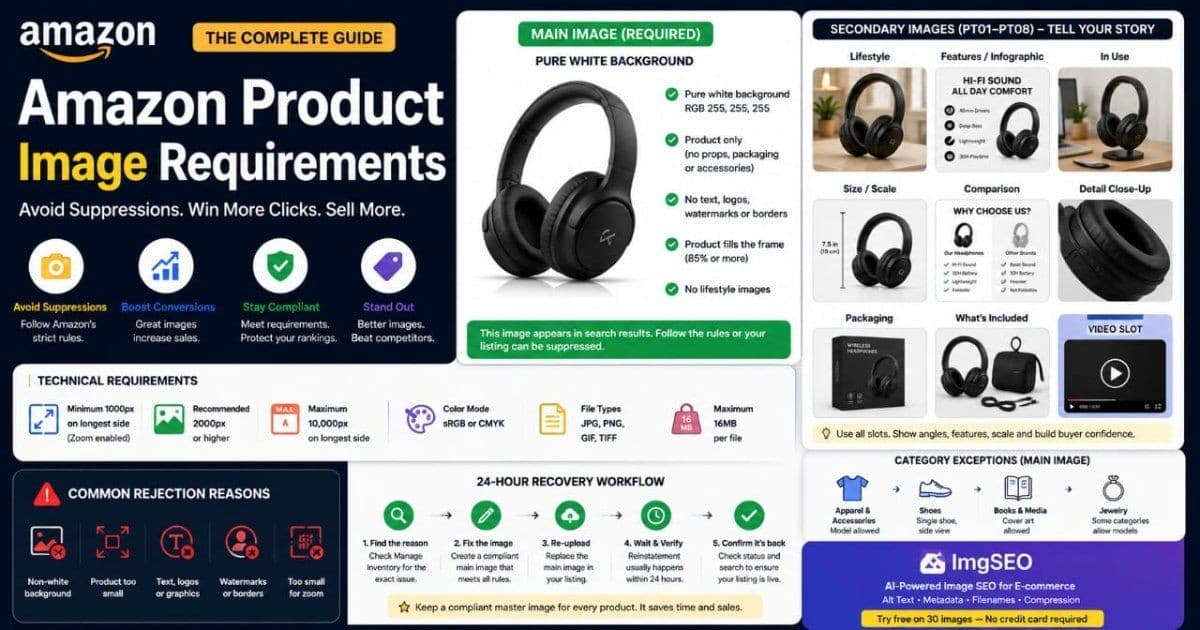
The main image (the MAIN slot) must show the product alone on a pure white background: RGB 255, 255, 255. The product should fill most of the frame. No props, no text, no logos, no watermarks, and no lifestyle context — per Amazon's current guidelines. This is the strictest slot, because it's what shoppers see in search results.
The rules for the MAIN image:
- Pure white background. RGB 255, 255, 255 exactly. Off-white, cream, or shadow-heavy backgrounds fail the automated check.
- Product fills the frame. Amazon's current guideline is roughly 85% or more. A small product floating in white space gets flagged.
- Product only. No mannequin props, no packaging (unless the packaging is the product), no accessories that aren't included.
- No text or graphics. No badges, no "best seller" banners, no logos, no borders, no watermarks.
- No lifestyle. No in-use shots, no models in a scene, no backgrounds. Those belong in secondary slots.
If you sell print-on-demand or Merch products, the same white-background rule applies to your mockups. Our print-on-demand image SEO guide covers how to prep those mockups cleanly.
Technical specs every image must meet
Beyond the white-background rule, Amazon sets technical minimums. Per Amazon's current guidelines, product images should be at least 1000px on the longest side to unlock zoom. They must use sRGB or CMYK color and save as JPEG, PNG, GIF, or TIFF. The maximum is 10,000px on the longest side.
- Minimum 1000px, longest side. Below this, the hover-to-zoom feature doesn't activate. Zoom drives conversion, so this threshold matters.
- 2000px is the practical target. It gives zoom room to work and keeps detail crisp on large screens.
- Maximum 10,000px. Anything larger is rejected at upload.
- Color mode: sRGB or CMYK. sRGB is the safe default for web display.
- File formats: JPEG, PNG, GIF, TIFF. JPEG is the common choice. Amazon converts and compresses on its end, so start with a clean, well-compressed source file.
Amazon re-compresses images through its CDN. Uploading an already-optimized JPEG avoids stacking its compression on top of a bloated file. For the full picture of image formats and compression, see our product image SEO guide.
Secondary images: what the other gallery slots allow
The secondary gallery slots (labeled PT01 through PT08 in a flat file) have almost none of the main image's restrictions. This is where you actually sell. Lifestyle shots, infographics, size charts, comparison tables, packaging, and in-use photos are all allowed.
Use each slot with intent:
- Lifestyle shots. The product in a real setting, in hand, or on a person. This is where context and scale land.
- Infographics. Callouts for key features, materials, and dimensions with short text labels.
- Size and scale. A size chart, or the product next to a common object for scale.
- Comparison table. Your product against a generic alternative, or across your own variants.
- Packaging and what's included. Reduces returns by setting accurate expectations.
- Detail shots. Close-ups of texture, stitching, or a mechanism.
The secondary slots have no background rule, so color, scene, and text are all fair game. Treat them as a visual sales page, not an afterthought.
The gallery setup top sellers use
A strong, common gallery pattern is seven images plus one video. That's one main white-background shot, three lifestyle photos, two infographics, and one size or comparison image. The video fills the gallery's video slot. This covers compliance, context, features, and scale in a single scroll.
- Slot 1 — MAIN: white background, product only.
- Slots 2–4 — lifestyle: in use, in a setting, and on or with a person.
- Slots 5–6 — infographics: feature callouts and materials or specs.
- Slot 7 — size/comparison: a scale reference or a comparison table.
- Video slot: a short demo or unboxing.
Fill every slot you're allowed. Empty gallery positions are a wasted chance to answer a buyer's question before they scroll to reviews.
Category exceptions to the main image rules
Some categories relax the product-only rule for the main image. Per Amazon's current guidelines, apparel and accessories often allow a model wearing the item on the main image. Shoes are typically shown at a set angle instead. Books, media, and jewelry each have their own conventions.
- Apparel and accessories. A model wearing the product is commonly allowed on the main image, still on a plain background.
- Shoes. Usually shown as a single shoe at a side angle, facing left, on white.
- Books and media. The cover art is the main image; the pure-white rule doesn't apply the same way.
- Jewelry. Often shot on white, but some subcategories allow a bust or hand model.
Category rules shift, and they vary by marketplace. Before you shoot a whole line, confirm the requirements for your exact category in Seller Central.
Does Amazon have alt text? What feeds A9 vs Google
Standard Amazon gallery images have no alt text field. Amazon generates the alt text that search engines read from your product title, so your title is the only lever for that. The A9 algorithm ranks on conversion, keywords, and sales history — not on image metadata.
That splits into two audiences:
- Amazon A9. Reads your title, backend keywords, and performance data. It does not read a per-image alt attribute, because there isn't one to fill.
- Google. Indexes your Amazon page and pulls the title-derived alt text for the image. A keyword-clear title is what Google sees describing the photo.
The exception is A+ Content, covered next — those modules do expose real alt text fields. To understand what good alt text looks like when you do control it, read how to write alt text for product images.
A+ Content image rules
A+ Content (formerly Enhanced Brand Content) uses a separate set of image rules, and the modules need higher resolution than gallery images. Per Amazon's current guidelines, full-width A+ modules call for images around 1464px wide. A+ Content is available to Brand Registry sellers.
Two things make A+ images worth extra care:
- Higher resolution. Full-width modules render large. Undersized images look soft. Build A+ assets at the module's target width, commonly 1464px wide, so they stay sharp.
- Alt text fields. Unlike gallery images, A+ modules include alt text fields. Fill them — they support accessibility, and Google can read them when it indexes the page.
Because Google indexes A+ Content, the copy and alt text there add keyword context to your listing beyond the title. That's a second reason to treat A+ as SEO surface, not just decoration.
Brand Registry image perks
Enrolling in Amazon Brand Registry unlocks image features standard sellers don't get. The two that move the needle are 360° spin images and a video in the main gallery slot. Both give shoppers a richer view before they buy.
- 360° spin. Shoppers rotate the product themselves. Strong for items where shape and detail drive the decision.
- Gallery video. A video slot in the image carousel, not just lower on the page.
- A+ Content and Premium A+. Richer module layouts and, at higher tiers, interactive elements.
Brand Registry also strengthens your control over the listing, which helps when you're fighting hijackers or incorrect images. If you own a brand, it's worth the enrollment.
Common rejection reasons and the 24-hour recovery workflow
Most image rejections trace to the same handful of causes. A non-white main background, a product too small in the frame, text or logos on the main image, or a file too small for zoom. Each one is fixable in a single re-upload.
When a listing gets suppressed, work this fast loop:
- Find the reason. Open Manage Inventory, filter to Suppressed, and read Amazon's stated cause.
- Fix the one image. Re-edit to a pure white background, enlarge the product to fill the frame, or strip any text and logos.
- Check the specs. Confirm at least 1000px on the longest side and a supported format before re-uploading.
- Re-upload and wait. Replace the main image. Reinstatement usually processes within a day, often faster.
- Confirm it's back. Recheck the status and search for your product to verify it reappears.
Keep a compliant master file for every product. When suppression hits, you swap it in and move on, instead of re-shooting under pressure.
Do Amazon images rank in Google Images?
Amazon rewrites your image filenames on upload, so the descriptive name you gave a file doesn't survive. Google still indexes Amazon product pages and can surface those images. But the alt text it reads comes from your product title, not a filename you control.
So is it worth optimizing filenames for Amazon? For A9, no — Amazon discards them. The payoff is elsewhere. The same product photos on your own website keep their filenames and alt text, and that's where you can genuinely compete in Google Images.
This is the honest takeaway: Amazon is a conversion channel with tight image control, while your own store is your image SEO channel. Optimize titles for Amazon, and optimize filenames, alt text, and metadata on the site you control. Our complete image SEO guide maps the full workflow.
Frequently asked questions
What happens if my main image has a background?
Amazon's automated checks flag any main image that isn't pure white (RGB 255, 255, 255). The listing can be suppressed until you upload a compliant version. A colored or lifestyle background belongs in a secondary slot, never the main image.
Can I use the same images on my own site and on Amazon?
Yes, and you should. Amazon strips filenames and gives no alt text control, so your own store is where the same photos earn Google Images visibility. Add descriptive filenames and alt text on your site, then reuse the visuals on Amazon for conversion.
Does Amazon let you add alt text to product images?
Not for standard gallery images — Amazon builds the alt text search engines read from your product title. A+ Content modules are the exception; those image slots include their own editable alt text fields.
Get your images right before they go live
Amazon's image rules are strict, but they're not complicated once you have them in front of you. Nail the main image, fill every secondary slot with intent, and keep a compliant master file so suppression never costs you more than one re-upload.
For the images you publish on your own store — where filenames and alt text actually count — try ImgSEO free. It's 30 images, no credit card required, and it writes alt text and metadata from what's in each photo. That's the part Amazon won't let you control, and the part that wins Google Images.