
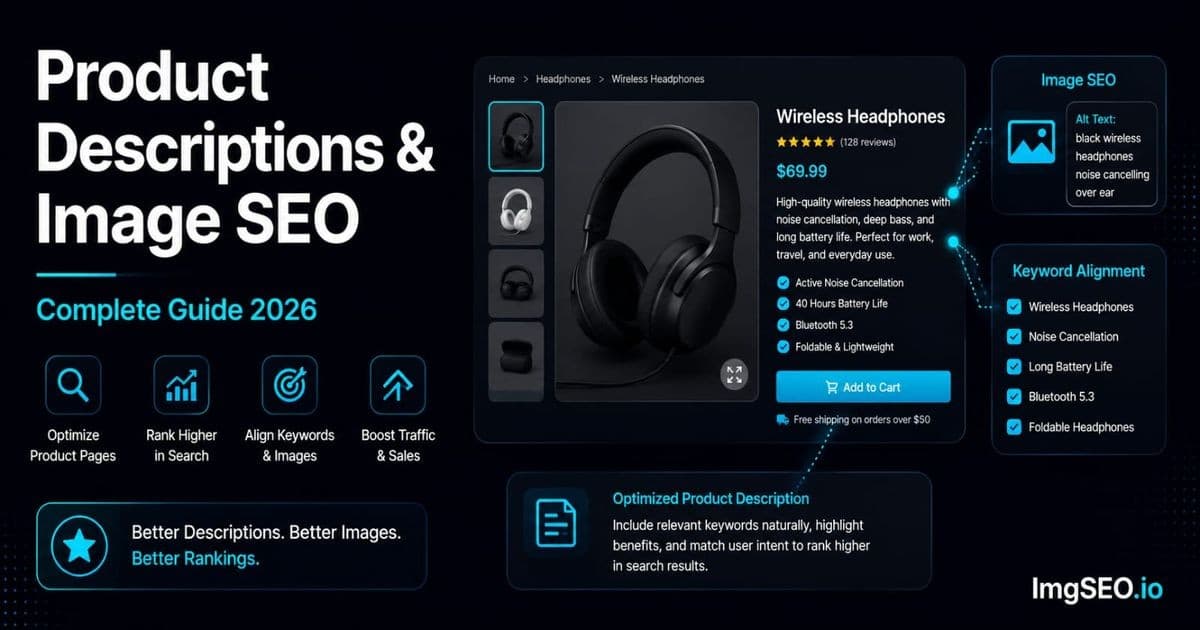
Your product description and your image alt text should tell the same story to Google. Most sellers treat them as separate tasks — write the description, then fill in the alt text as an afterthought. That is the wrong order of operations, and it is costing you rankings.
When the text signals on a product page align with the image signals, Google's confidence in what your page is about increases. When they conflict — description says "premium handcrafted leather goods," alt text says "image1" — Google has to guess, and guessing means weaker rankings. This guide explains how to make those signals work together, with concrete before-and-after examples, platform-specific advice, and a workflow you can apply to every product from day one.
What you will learn: how page context affects image rankings, the keyword alignment principle, platform-specific implementation for Shopify, Etsy, and WooCommerce, how to write alt text that mirrors your description, and a six-step workflow you can repeat at scale.
Key Takeaways
- Description and alt text should tell Google the same story — your primary keyword needs to appear consistently across the description, main image alt text, filename, and metadata.
- A useful technique: write your description as if you're describing the photograph itself; the visual language (color, material, texture, shape) is exactly what belongs in alt text too.
- 300–500 words is the sweet spot for most products — enough room for secondary keywords, dimensions, and use cases, with diminishing SEO returns past 500.
How Product Descriptions Affect Image SEO
Page Context Is a Ranking Signal
Google does not look at your images in isolation. When it crawls a product page, it reads everything — the title, headings, body copy, alt text, filenames, and structured data — and uses all of it to understand what the page and its images are about. Your product description is a major input into that understanding.
This is documented behavior, not speculation. Google's image ranking documentation explicitly notes that the text on a page helps determine image relevance. A product image appearing on a page where the surrounding text is rich with relevant keywords will rank better in Google Images than the same image on a sparse or keyword-mismatched page.
The practical implication: every word you write in your product description is also, indirectly, helping (or hurting) your image SEO.
The Keyword Alignment Principle
Maximum SEO signal happens when your primary keyword appears in all five places that Google looks at for a product page:
- Product title — the H1 Google uses as the page's primary subject
- Product description — specifically the first paragraph, where keyword weight is highest
- Image alt text — the text substitute Google reads when it cannot fully interpret the image
- Image filename — read before the image is even crawled
- Image metadata — EXIF title and XMP
dc:titlefields embedded in the file itself
When all five reinforce the same keyword, you are sending Google five consistent signals instead of one. That coherence is a competitive edge that most sellers overlook because no single platform forces you to coordinate them.
When description keywords conflict with alt text keywords, you create noise. Google does not know which signal to trust, and the result is that neither ranks as well as it should.
Writing Product Descriptions That Support Image SEO
Structure Your Description for SEO
The structure of your description determines where keywords land, and keyword position matters. Here is the pattern that serves both readability and SEO:
- First sentence: primary keyword + the most important product feature. This is the highest-value real estate on the page.
- Second paragraph: secondary keywords, materials, dimensions. These are strong search signals — shoppers searching "14 inch macramé wall hanging" are closer to buying than shoppers searching "wall art."
- Third paragraph: use cases and lifestyle context. This supports lifestyle image alt text.
- Final section: technical specs and variants. Dimensions, color options, SKU details — useful for long-tail queries and schema markup.
This structure is not arbitrary. It mirrors how Google assigns weight to content: earlier in the page, earlier in the section, closer to headings all carry more authority.
Keyword Research for Descriptions and Images
The same keyword research that drives your description should drive your alt text. You are not doing keyword research twice — you are doing it once and applying it in two places.
Tools worth using:
- Google autocomplete — type your product into Google's search bar and look at the suggestions. Those are real searches.
- Pinterest search — visual product searches on Pinterest often surface different long-tail variations than Google.
- Etsy search bar — if you sell on Etsy, type your product category into Etsy's search. The autocomplete shows what buyers are actually typing.
- Google Search Console — if your store has any search history, the queries report shows you what is already driving impressions.
Long-tail keywords consistently outperform broad terms for product pages. "Sterling silver minimalist ring size 7" is harder to rank for in terms of competition but far more likely to convert than "ring." It is also more specific alt text, which gives Google more to work with.
The Visual Description Technique
Here is a shortcut that aligns descriptions and alt text automatically: write your product description as if you are describing the photograph.
Instead of: "A beautiful ring that will make a perfect gift for someone special."
Write: "This slim sterling silver ring features a hammered texture band with a high-polish finish, measuring 2mm wide in a size 7."
The second version is visual. It describes exactly what appears in the product photo. Now when you write the alt text — "hammered texture sterling silver ring 2mm band size 7" — the overlap is immediate and natural. You are not forcing keyword alignment; you built it into the description.
This technique works across categories. A leather wallet description that mentions "full-grain vegetable-tanned leather with hand-stitched edges" gives you the exact raw material for alt text: "brown leather bifold wallet full-grain vegetable-tanned hand-stitched." The description writes the alt text for you.
Platform-Specific Description and Image SEO
Shopify
Shopify's SEO architecture is well-suited to keyword alignment if you use it intentionally.
- Product title: this becomes the page's H1. Put your primary keyword at the start of the title, not the end. "Handmade Leather Bifold Wallet Mens Brown RFID" outperforms "RFID Blocking Men's Wallet - Brown Handmade Leather."
- Description: the first paragraph feeds the meta description if you have not manually set one. Make it keyword-rich and specific.
- Alt text: Shopify stores alt text per image variant. You have to set it for each image you upload — it does not inherit from the title.
- Metafields: use metafields to add additional keyword context (materials, dimensions, collection) that does not fit naturally in the description.
For a detailed walkthrough of Shopify-specific image optimization, see the Shopify image SEO guide.
Etsy
Etsy's search algorithm reads titles and descriptions differently from Google, but Google also indexes Etsy listings — which means your Etsy SEO and your Google image SEO are pointing at the same page.
- Title: 140 characters, keyword-rich, no punctuation. Etsy's own guidance recommends front-loading your most important keywords. "Dainty Gold Chain Necklace Layering Necklace 18 Inch Minimalist Birthday Gift" is a valid Etsy title.
- Description: the first 160 characters appear in Google's search snippet. Write for search visibility first, then continue with full details.
- Alt text (describe this photo field): Etsy surfaces this field when you upload images. Use it. Align the keywords with your title keywords — Etsy buyers and Google are both reading both.
- Tags: 13 tags available. Use long-tail keyword phrases, not single words. "minimalist gold necklace" is more valuable than "necklace."
For a complete Etsy-specific guide, see Etsy image SEO.
WooCommerce
WooCommerce gives you the most control and the most responsibility. Nothing is automated.
- Product title: becomes the H1 and the SEO title unless you override it in Yoast or RankMath. Primary keyword front-loaded.
- Short description: appears in product snippets on shop pages and often in Google's search results. Treat it like a meta description — keyword-rich and under 160 characters.
- Long description: full keyword context lives here. More text means more semantic signals for Google.
- Alt text: set manually in the Media Library or the Product Images metabox. Neither Yoast nor WooCommerce auto-populates alt text from product titles.
For full WooCommerce image optimization, see the WooCommerce image SEO guide.
Writing Alt Text That Aligns with Your Description
The Alignment Formula
Given a product description, here is the formula for writing aligned alt text:
- Identify the primary keyword used in your description's first sentence
- Add the specific visual detail shown in that particular image (angle, material, feature, context)
- Strip filler words; keep it under 125 characters
Example — Jewelry:
| Element | Content |
|---|---|
| Description says | "Handmade sterling silver minimalist ring with hammered texture" |
| Main image alt text | "Handmade sterling silver minimalist ring hammered texture size 7" |
| Metadata title | "Handmade Sterling Silver Minimalist Ring" |
| Filename | handmade-sterling-silver-minimalist-ring-hammered.jpg |
The keyword "handmade sterling silver minimalist ring" appears in all four. The alt text and filename add the image-specific descriptor (hammered texture, size 7) that gives Google additional context.
What to Avoid
Keyword mismatch: Description says "premium quality product" → alt text says "ring." Google has no way to connect these. The description fails to provide useful page context, and the alt text fails to describe the image.
Thematic drift: Description focuses on the lifestyle story ("gift for the woman who has everything") while alt text focuses on technical specs ("0.5mm sterling silver band 925 hallmark"). Both are valid on their own, but together they fragment Google's understanding. Keep the primary keyword consistent across both.
Different keyword sets: If your description targets "linen wide leg pants women" but your alt text reads "flowy trousers boho," you are splitting your ranking potential between two keyword clusters instead of concentrating it.
Examples by Product Category
Jewelry
- Description keyword: "dainty gold chain necklace layering"
- Alt text: "dainty gold chain necklace layering minimalist 18 inch"
- Filename:
dainty-gold-chain-necklace-layering-18-inch.jpg
Clothing
- Description keyword: "linen wide leg pants women summer"
- Alt text: "women linen wide leg pants natural beige summer casual"
- Filename:
women-linen-wide-leg-pants-beige-summer.jpg
Home Decor
- Description keyword: "handmade ceramic vase minimalist white"
- Alt text: "handmade ceramic vase minimalist white matte 10 inch"
- Filename:
handmade-ceramic-vase-minimalist-white-matte.jpg
Structured Data: Connecting Description and Images
Product Schema
Structured data is the third layer of the alignment stack, sitting above alt text and below the visible content. Product schema tells Google explicitly:
- What your product title is
- What your description says
- Which images belong to this product
- What the price and availability are
When schema data aligns with the visible page content and the image alt text, Google has three independent confirmations of what your product is. That redundancy strengthens rankings.
How to Implement
- Shopify: Product schema is generated automatically for every product page. You do not need to add anything.
- WooCommerce: Yoast SEO or RankMath (both free tiers) generate Product schema automatically once configured.
- Etsy: Etsy generates schema automatically for all listings. You do not control the output directly.
The Image Property in Schema
Product schema includes an image property that accepts an array of image URLs. Include multiple images — hero shot, detail shots, lifestyle shots — and make sure the URLs point to your optimized, correctly-named files. Each image URL in schema reinforces the alt text signal for that image, because Google can now trace the connection between the image, its alt text, and the structured product data.
Writing Descriptions for Multiple Images
Each Image Needs Corresponding Description Context
A product page typically has four to six images: hero shot, material/detail close-up, lifestyle shot, size reference, and possibly color variants. Each image needs its own alt text. That alt text needs contextual support from the description — and your description can provide it if you structure it correctly.
- Main image alt text → supported by the opening description paragraph (primary keyword + main feature)
- Detail shot alt text → supported by the materials and features section
- Lifestyle shot alt text → supported by the use cases section
- Size reference alt text → supported by the dimensions section
This is not coincidence — it is deliberate structure. Write the description so each section corresponds to a type of image you plan to show.
Example: Complete Product Page Alignment
Product: Handmade Leather Wallet
Title: Brown Leather Bifold Wallet Mens RFID Blocking Handmade
Description opening: "This handmade brown leather bifold wallet is crafted from full-grain vegetable-tanned leather with hand-stitched edges and RFID-blocking lining. It fits 8 cards and folds flat to under 10mm."
Materials section: "Full-grain leather develops a natural patina over time. Each wallet is hand-stitched with waxed thread and lined with RFID-blocking material tested to block 13.56 MHz signals."
Use case section: "Slim enough for a front pocket, durable enough for daily carry. Works equally well as a travel wallet or everyday wallet."
Dimensions section: "Dimensions: 11cm x 9cm x 0.8cm folded. Holds 6-8 cards plus bills."
| Image | Alt Text | Filename |
|---|---|---|
| Hero (front view) | "Brown leather bifold wallet mens front view full-grain leather" | brown-leather-bifold-wallet-mens-front.jpg |
| Detail (stitching) | "Hand-stitched edge detail on brown leather bifold wallet" | brown-leather-bifold-wallet-hand-stitched-detail.jpg |
| Open (interior) | "Brown leather bifold wallet open showing card slots and bill compartment" | brown-leather-bifold-wallet-open-card-slots.jpg |
| Lifestyle | "Man holding brown leather bifold wallet casual everyday use" | brown-leather-bifold-wallet-lifestyle-mens.jpg |
Every alt text pulls from the description language. Google sees four images, all consistently described, all supported by a description that uses the same vocabulary. That is a coherent page.
Common Description and Image SEO Mistakes
1. Writing the description after adding images. This is the most common sequencing mistake. Write the description first — it establishes the keywords — then write alt text that mirrors it.
2. Using different keywords in description vs alt text. "Artisan handcrafted leather goods" in the description and "bifold wallet" in the alt text splits your ranking potential.
3. Generic descriptions. "High quality product you will love" gives Google nothing to work with. Neither does "perfect gift for any occasion." Both waste the most valuable keyword real estate on your page.
4. Missing first paragraph keyword. The opening sentence carries the most SEO weight. If your primary keyword does not appear until paragraph three, you have already lost most of its value.
5. Same alt text on all product images. If every image has the same alt text, Google treats them as duplicates and may only index one.
6. Description focused on brand story, not product features. Brand story belongs in your About page. Product descriptions should describe the product — specifically and visually.
7. Not including dimensions and materials. "Ceramic vase" is a weak keyword. "Handmade ceramic vase matte white 10 inch" is four strong keywords in one phrase. Dimensions and materials are how buyers actually search.
The Complete Workflow: Description + Image SEO Together
Step 1: Keyword Research
Find one primary keyword and three to five secondary keywords before you write anything. Check search volume with Google autocomplete, Pinterest, or your platform's own search bar. Long-tail beats broad for product pages.
Step 2: Write the Product Description
Open with the primary keyword in the first sentence. Incorporate secondary keywords naturally throughout. Describe visual features — color, material, texture, size — because these create natural overlap with what you will write in alt text.
Step 3: Write Alt Text for Each Image
Reference the same primary keyword. Describe what is visually present in that specific image angle. Keep each alt text unique — you have a different shot for a reason; describe that difference.
Step 4: Create Filenames
Use the primary keyword plus a specific descriptor per image. Keep filenames consistent with your alt text vocabulary. Hyphens between words, no underscores, no spaces.
Step 5: Add Metadata
The EXIF title and XMP dc:title fields should match the primary keyword from your description opening. The keywords field should mirror the secondary keywords you used in the description. ImgSEO generates and embeds this metadata automatically — you upload the image, enter your product name, and it outputs a renamed, metadata-optimized file ready for your product page.
Step 6: Upload and Verify
After uploading, confirm that alt text is saved correctly in your platform (Shopify, WooCommerce, and Etsy each have different UI flows for this). Check that the filename is preserved in the product image URL. For Shopify and WooCommerce, run a spot-check with the Google Rich Results Test to verify that Product schema is rendering correctly.
Description and Image SEO Checklist
Use this checklist for every new product you list:
- ✅ Primary keyword in product title
- ✅ Primary keyword in first sentence of description
- ✅ Same primary keyword in main image alt text
- ✅ Same primary keyword in main image filename
- ✅ Same primary keyword in image EXIF/XMP metadata
- ✅ Secondary keywords in description body and secondary image alt text
- ✅ Visual descriptors (color, material, size) in both description and alt text
- ✅ Unique alt text for each product image
- ✅ Product schema implemented (Shopify/Etsy auto; WooCommerce needs Yoast or RankMath)
- ✅ Description length: 150+ words minimum for meaningful SEO context
FAQ
Does product description affect image SEO? Yes. Google uses all text on a page — including the description — to understand what images on that page show. A keyword-rich description that matches your image alt text creates a stronger combined signal than either does alone.
Should I use the same keywords in alt text and description? Your primary keyword should appear in both. Secondary keywords can vary by image (each image shows something different), but the primary keyword should be consistent across the description, the main image alt text, the filename, and the metadata.
How long should a product description be for SEO? 150 words is a practical minimum to give Google meaningful context. 300–500 words allows you to naturally incorporate secondary keywords, dimensions, materials, and use cases without keyword stuffing. Beyond 500 words, returns diminish for most product types.
What is the most important keyword placement for image SEO? The first sentence of the description and the main product image alt text carry the most weight. If you only optimize two things, optimize those two — and make sure they use the same keyword.
Does Etsy description help Google Images ranking? Yes. Etsy listings are indexed by Google. The description text on an Etsy listing contributes page context that Google uses when deciding how to rank that listing's images in Google Images results.
How do I write alt text that matches my description? Use the visual description technique: write your description as if you are describing the photograph. The visual language you use in the description — color, material, texture, shape — is exactly the language that belongs in the alt text.
Should I mention colors and materials in both description and alt text? Yes. Colors and materials are two of the strongest keyword modifiers for product searches. "Sage green linen throw pillow" is a far more specific and rankable phrase than "throw pillow." Include them in both.
What is structured data and does it help image SEO? Structured data (specifically Product schema) is machine-readable markup that explicitly tells Google what your product is, what it looks like, and how much it costs. Including images in your Product schema reinforces your alt text signals and can improve both standard search and Google Shopping results.
Conclusion
Product descriptions and image alt text are two halves of the same SEO signal. Treat them as separate tasks and you leave ranking potential on the table. Align them around a shared primary keyword and you give Google five consistent signals — title, description, alt text, filename, metadata — all pointing to the same product.
The six-step workflow in this guide is not complicated: research first, write the description, derive alt text from the description language, name files consistently, embed metadata, verify after upload. The discipline is in doing it for every product, not just the ones you think matter most.
ImgSEO handles steps four and five automatically. Upload your image, provide your product name, and it generates optimized filenames, writes alt text suggestions, and embeds EXIF/XMP metadata before you upload to your store. Try it free — 30 images, no card required.
For a broader view of image optimization best practices, see the image SEO checklist for 2026.


