
Choosing the wrong image SEO tool does not just waste money — it wastes the hours you spent using it and leaves ranking gaps that a better tool would have closed. The right tool can compress, rename, add metadata, and generate alt text for a hundred product images in less time than it takes to do one manually.
The problem is that the market is fragmented. Some tools only compress. Some only edit metadata. Some generate alt text but ignore metadata entirely. And the all-in-one tools vary enormously in how well they handle the SEO-specific requirements of e-commerce product images versus generic web graphics.
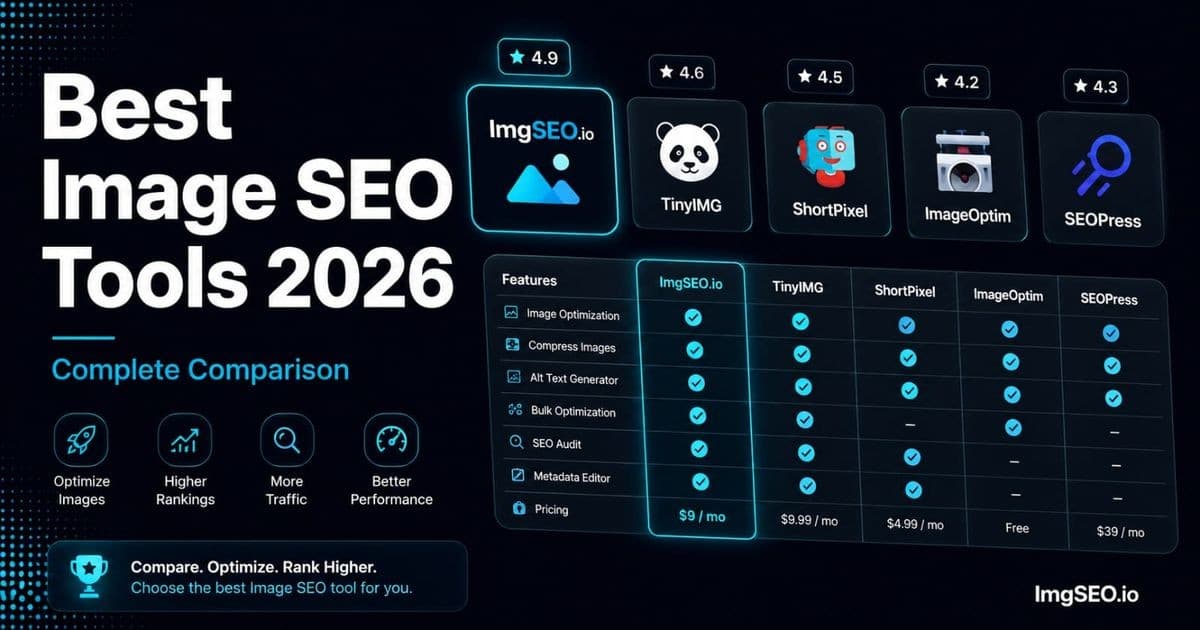
This comparison covers five categories of image SEO tools — all-in-one platforms, compression tools, alt text generators, metadata editors, and platform-specific SEO apps — with honest assessments of what each does well and where it falls short. At the end, you will find platform-specific recommendations and a head-to-head comparison table.
Key Takeaways
- A full manual workflow (rename, alt text, EXIF/XMP metadata, compression) runs about 12 minutes per image — 100 hours for a 100-product catalog with 5 images each.
- At a $15/hour freelance rate, that manual workload costs about $1,500; ImgSEO Pro at $19/month delivers a roughly 79x time-cost ROI in the first month.
- No free tool covers all three core tasks — compression tools like TinyPNG and ShortPixel strip metadata by default, and ExifTool has no AI generation or GUI.
Category 1: All-in-One Image SEO Tools
All-in-one tools handle multiple image SEO tasks in a single workflow. For e-commerce sellers who need alt text, metadata, and compression handled together, these are the most efficient option.
ImgSEO
ImgSEO is purpose-built for e-commerce product image SEO. It combines AI-generated alt text, SEO-friendly filename suggestions, EXIF and XMP metadata embedding, and image compression into a single upload step.
What it does: Upload a product image, and ImgSEO uses GPT-4o vision to analyze what is in the image, generates optimized alt text based on what it sees plus any product context you provide, embeds that alt text and keyword data as EXIF and XMP metadata directly into the image file, and compresses the output. One step replaces four separate manual tasks.
Best for: Shopify, Etsy, WooCommerce, and Amazon sellers who want complete image SEO coverage without stitching together multiple tools.
Pricing: Free (30 images lifetime), Starter $9/month, Pro $19/month, Business $29/month.
Pros:
- The only e-commerce tool that combines AI alt text + EXIF metadata + XMP metadata + compression
- Alt text generation is product-aware — understands e-commerce context, not just generic image labels
- Bulk processing handles multiple images simultaneously
- Works for every platform — no platform lock-in
- Metadata is embedded in the file, so it survives platform uploads
Cons:
- Focused specifically on product and e-commerce images — not a general web image tool
- Alt text generation quality depends on image clarity; blurry or low-light images produce weaker results
Start with 30 free images — no credit card required.
Adobe Lightroom
Lightroom is the professional standard for photo editing and metadata management. It is not designed for SEO, but its metadata capabilities are comprehensive.
What it does: Full photo editing (exposure, color, sharpening) plus batch EXIF, IPTC, and XMP metadata editing. You can apply a metadata preset to thousands of images in one operation.
Best for: Professional photographers managing large catalogs who already use Adobe Creative Cloud for editing.
Pricing: $10/month (Photography plan, includes Lightroom and Photoshop).
Pros:
- Industry standard with comprehensive metadata support (EXIF, IPTC, and XMP)
- Excellent batch processing for metadata presets
- Non-destructive editing preserves originals
Cons:
- No AI SEO generation — you write every alt text and metadata entry manually
- No built-in compression to web-ready file sizes
- Steep learning curve for users who just need SEO metadata
- Subscription required
Canva
Canva is a graphic design tool, not an image SEO tool. It appears in many "image SEO" tool lists because it is popular for creating product graphics and marketing images, but its SEO capabilities are essentially nonexistent.
What it does: Template-based graphic design for social media, marketing materials, and presentations. Exports to PNG, JPEG, and PDF.
Best for: Creating marketing graphics, social media images, and visual content — not product photo SEO.
Pricing: Free tier, Pro $15/month.
Pros: Extremely easy to use, large template library, good for non-designers.
Cons: No metadata editing, no SEO optimization, no compression control, not suitable for product photography. If you are trying to optimize product images for Google Images ranking, Canva is the wrong category of tool entirely.
Category 2: Compression Tools
Compression reduces file size without (ideally) visible quality loss. It is essential for page speed, which is a Google ranking factor. These tools focus on compression only — they do not add alt text or metadata.
Squoosh (by Google)
Squoosh is a browser-based compression tool built by the Google Chrome team. It is the gold standard for understanding compression quality versus file size tradeoffs.
What it does: Side-by-side comparison of original and compressed images, with real-time quality adjustment. Supports JPEG, WebP, AVIF, PNG, and several other formats.
Best for: Manual compression of individual images where you want precise control over quality settings.
Pricing: Free, no account required.
Pros:
- Exceptional quality control with live before/after preview
- Converts to WebP and AVIF in the browser
- No file size limits
- No upload to a third-party server
Cons:
- One image at a time — no batch processing
- No metadata handling (does not add or preserve metadata)
- No SEO features
For a product catalog, Squoosh is most useful for calibrating your target quality settings before running a batch through a different tool.
TinyPNG / TinyJPG
TinyPNG and TinyJPG are simple online compression tools from the same company (TinyPNG handles both formats despite the name split).
What it does: Drag-and-drop compression for PNG and JPEG files. Lossy compression using smart quantization.
Best for: Quick single-image or small-batch compression without installing anything.
Pricing: Free (up to 20 images per day, 5MB per image), Pro $25/year (unlimited).
Pros:
- Simple and fast
- Good compression ratios, especially for PNG
- API available for automated workflows
Cons:
- Strips all metadata — EXIF and XMP data is removed on compression. If you add metadata before running through TinyPNG, you lose it.
- No WebP output format
- No SEO features
The metadata stripping issue is important. If you use TinyPNG in your workflow, compress first, then add metadata — not the other way around.
ShortPixel
ShortPixel is a WordPress plugin that automatically compresses images on upload and can bulk-process your existing media library.
What it does: Automatic compression on upload, WebP conversion, and bulk compression of existing images. Integrates directly with the WordPress media library.
Best for: WooCommerce stores that want automatic compression without a separate workflow step.
Pricing: Free (100 images/month), paid plans from $3.99/month (10,000 credits).
Pros:
- Automatic — no manual step required after setup
- WebP conversion and serving via picture element
- Bulk processing of existing library
- Three compression levels (lossy, glossy, lossless)
Cons:
- WordPress/WooCommerce only — no value for Shopify or Etsy sellers
- Strips metadata by default — check settings; there is an option to preserve metadata but it is not on by default
- No alt text generation or SEO features beyond compression
Imagify
Imagify is another WordPress compression plugin from the WP Rocket team, with a similar feature set to ShortPixel.
What it does: Automatic compression on upload, WebP support, bulk optimization, and an option for three compression levels (normal, aggressive, ultra).
Best for: WooCommerce stores, particularly those already using WP Rocket for caching.
Pricing: Free (20MB/month), paid from $4.99/month.
Pros:
- Tight integration with WP Rocket
- Three compression levels with previews
- WebP support
Cons:
- WordPress only
- Metadata handling varies by compression level — check settings before bulk processing
- Monthly MB limit on the free plan is low for active product catalogs
Category 3: Alt Text Generators
Alt text is the highest-impact image SEO signal most sellers can improve quickly. These tools generate alt text automatically rather than requiring you to write it manually for every image.
ImgSEO (AI)
ImgSEO uses GPT-4o vision to analyze each image and generate alt text with e-commerce context. Unlike generic computer vision APIs, it understands product photography — it knows that a close-up of stitching on a wallet is a detail shot, not a generic texture image, and writes alt text accordingly.
The output includes platform-appropriate formatting: Etsy alt text stays within the 500-character limit; Shopify and WooCommerce alt text follows standard SEO guidelines of under 125 characters; metadata fields are populated with keyword arrays suitable for EXIF and XMP embedding.
See how it works on your images — 30 free.
Microsoft Azure Computer Vision
Azure Computer Vision is an API that analyzes images and returns descriptions, tags, and object detection results. It is not an e-commerce tool — it is a developer API.
What it does: Returns a generated image caption, a confidence score, and a list of detected objects and tags.
Best for: Developers building custom alt text generation pipelines.
Pricing: Free (5,000 API calls/month), pay-per-use after.
Pros:
- Accurate visual analysis
- Returns structured data that can be processed programmatically
- Reliable API with good uptime
Cons:
- Requires development work — there is no UI
- Output is generic image description, not SEO-optimized alt text
- No e-commerce product context — treats a product image the same as a random photograph
- No metadata embedding
Google Cloud Vision
Google Cloud Vision is Google's equivalent to Azure Computer Vision — an API for image analysis, labeling, and object detection.
What it does: Returns labels, objects, text detected in the image, and safe search annotations.
Best for: Developers who want Google's AI for image analysis in a custom pipeline.
Pricing: Free (1,000 units/month), pay-per-use after.
Pros:
- Google's own AI — potentially aligned with how Google understands your images
- Rich label and object detection output
Cons:
- Developer API only, no UI
- Labels are generic ("brown", "leather", "accessory") — not SEO-optimized alt text
- No e-commerce product understanding
- No metadata embedding
Shopify Alt Text Apps
Several Shopify apps in the App Store offer alt text generation:
SEO Image Optimizer by Booster Apps — Uses template-based alt text generation (fills in product title and type from Shopify data). Fast but not AI-powered; output quality depends on how well your Shopify product data is filled in. Pricing: ~$14.99/month.
Alt Text AI by Entaice — Uses AI to generate alt text from product images. Shopify-native with bulk processing. Pricing: ~$9/month.
Pros of Shopify-specific apps: Native Shopify integration, easy installation, no separate workflow.
Cons: Limited to Shopify; do not embed metadata into image files; AI quality varies; no compression.
For sellers on multiple platforms (Shopify + Etsy, or Shopify + Amazon), a Shopify-only tool means running a separate workflow for each platform.
Category 4: Metadata Editors
Metadata editors write EXIF, IPTC, and XMP data directly into image files. This is the technical foundation for embedded image SEO — the data that travels with the file through platform uploads.
ExifTool
ExifTool is the most powerful metadata editor available. It is free, open source, and supports every metadata format for every image format including WebP and AVIF — formats that most GUI metadata editors do not support.
What it does: Command-line tool for reading and writing EXIF, IPTC, and XMP metadata across virtually every image and video format. Supports batch processing via shell scripts.
Best for: Technical users who need to process large volumes of images programmatically, or developers building metadata automation pipelines.
Pricing: Free and open source.
Pros:
- Supports all formats including WebP and AVIF — critical for modern e-commerce
- Extremely powerful batch processing via command line
- Can read, write, copy, and strip any metadata field
- Cross-platform (Windows, Mac, Linux)
Cons:
- Command-line only — there is no GUI
- Steep learning curve for non-technical users
- No AI generation — you supply all metadata manually or via script
- Writing a batch script for 500 product images requires meaningful development time
A typical ExifTool command for adding product metadata looks like:
exiftool -XPTitle="Brown Leather Bifold Wallet" -ImageDescription="mens brown leather bifold wallet RFID blocking" -XPKeywords="leather wallet;mens wallet;bifold wallet" product-image.jpg
Powerful, but not a tool for someone who just wants to optimize their Etsy shop.
Adobe Bridge
Bridge is Adobe's free desktop application for organizing and batch-editing metadata. It provides a GUI for the same operations ExifTool does on the command line.
What it does: Visual metadata editor with support for EXIF, IPTC, and XMP. Metadata templates can be created and applied to batches of images. Free with a Creative Cloud account (not free standalone).
Best for: Professional photographers and large e-commerce operations already in the Adobe ecosystem.
Pricing: Free with any Creative Cloud subscription.
Pros:
- Visual interface is much more approachable than command-line tools
- Batch metadata application via templates
- XMP support for modern formats
Cons:
- Requires Creative Cloud account (minimum $10/month for Photography plan)
- Not designed for e-commerce SEO workflows
- No AI generation
DigiKam
DigiKam is a free, open-source photo management application with comprehensive metadata editing capabilities. It runs on Windows, Mac, and Linux.
What it does: Full EXIF, IPTC, and XMP metadata editing with a visual interface. Batch processing support. More powerful than Windows File Properties, less complex than Bridge.
Best for: Technical users who want a free GUI metadata editor without the Adobe dependency.
Pricing: Free and open source.
Pros:
- Full metadata support across formats
- Free with no subscription
- Cross-platform
Cons:
- Interface is dated and can be confusing for new users
- Not designed for e-commerce workflows
- No AI generation
Windows File Properties
The simplest metadata editing option for Windows users: right-click any image file, select Properties → Details, and you can edit basic EXIF fields including title, subject, tags, and comments directly.
What it does: Basic EXIF metadata editing for individual images, built into Windows Explorer.
Best for: Beginners who need to edit metadata on a single image occasionally.
Pricing: Free — built into Windows.
Pros:
- No installation required
- Accessible to anyone on Windows
- Good for understanding what metadata fields exist
Cons:
- EXIF fields only — no XMP support
- One image at a time — no batch processing
- Limited field coverage compared to dedicated tools
Category 5: Platform-Specific SEO Tools
These tools handle SEO tasks within a specific platform's ecosystem. They are not primarily image SEO tools, but they include image-related features.
Shopify SEO Apps
Smart SEO by Sherpas Design — Automates meta titles, descriptions, and JSON-LD structured data. Includes bulk alt text editing using product data templates. Pricing: ~$9.99/month.
SEO Manager by venntov — Comprehensive Shopify SEO with alt text management, broken link fixing, and structured data. Pricing: ~$20/month.
These apps handle alt text at the Shopify CMS level — they write the alt text into Shopify's product database, not into the image file itself. That is sufficient for Google to read via the HTML <img> tag, but it does not embed metadata into the image file.
See the Shopify SEO guide for a full breakdown of the Shopify SEO stack.
Etsy SEO Tools
eRank — The leading keyword research tool for Etsy. Tracks listing rankings, suggests keywords, and analyzes competitor listings. Pricing: Free tier, paid from $5.99/month.
Marmalead — Etsy SEO analytics with keyword grading and listing optimization scoring. Pricing: $19/month.
Important caveat: eRank and Marmalead focus on listing text SEO (title, tags, description) — not image SEO. They do not edit alt text, filenames, or metadata. For Etsy image SEO, you still need to fill in the "Describe this photo" field manually or use a tool like ImgSEO that generates the alt text for you to paste in.
See the Etsy SEO guide for the full Etsy SEO workflow.
WooCommerce SEO Plugins
Yoast SEO — The most widely used WordPress SEO plugin. Generates XML sitemaps (including image sitemaps), manages meta tags, and outputs Product schema. Free tier is sufficient for most stores; Yoast WooCommerce SEO ($79/year) adds product-specific schema enhancements.
RankMath — A comprehensive SEO plugin with a free tier that includes image SEO features: image sitemap, ALT attribute analysis in the content editor, and Product schema with image property. Often considered more capable than Yoast at the free tier.
Neither plugin embeds metadata into image files — they handle SEO at the WordPress/HTML layer. For metadata embedding, you still need a file-level tool.
See the WooCommerce image SEO guide for the full plugin stack recommendation.
Head-to-Head Comparison Table
| Tool | Alt Text | Metadata | Compression | AI | Price | Platforms | |---|---|---|---|---|---|---| | ImgSEO | ✅ AI-powered | ✅ EXIF + XMP | ✅ | ✅ | From free | All | | Adobe Lightroom | ❌ Manual only | ✅ Full | ❌ | ❌ | $10/mo | All | | ShortPixel | ❌ | ❌ (strips it) | ✅ | ❌ | From free | WP only | | Squoosh | ❌ | ❌ | ✅ | ❌ | Free | All | | ExifTool | ❌ Manual only | ✅ Full | ❌ | ❌ | Free | All | | TinyPNG | ❌ | ❌ (strips it) | ✅ | ❌ | From free | All | | Azure Vision | ✅ Generic | ❌ | ❌ | ✅ | From free | API only | | Yoast SEO | ❌ | ❌ (HTML only) | ❌ | ❌ | Free / $79/yr | WP only | | eRank | ❌ | ❌ | ❌ | ❌ | From free | Etsy only |
The table makes the gap visible: no free tool covers all three core tasks (alt text + metadata + compression). Every multi-tool workflow involves at least two or three separate steps — and each handoff is a chance to lose metadata or skip a step under time pressure.
Which Tool is Right for You?
If you sell on Shopify
Complete solution: ImgSEO for alt text, metadata embedding, and compression before upload — then paste alt text into the Shopify product editor. Optionally add Smart SEO or SEO Manager for bulk alt text management across existing products.
Budget / manual option: Squoosh for compression (free, one image at a time) + write alt text manually in the Shopify product editor. Slow, but zero cost.
What Shopify sellers cannot skip: alt text in the product editor and descriptive filenames before upload. Shopify preserves the filename you upload, so getting it right before upload has lasting SEO value.
Full workflow detail in the Shopify SEO guide.
If you sell on Etsy
Complete solution: ImgSEO generates Etsy-appropriate alt text (aware of platform conventions) and embeds metadata before upload. Copy the generated alt text into Etsy's "Describe this photo" field.
Additional tool: eRank for keyword research — use it to identify high-volume Etsy search terms, then use those terms in your ImgSEO alt text generation prompts.
Etsy-specific note: Etsy renames image files internally, so filename SEO is less impactful here than on Shopify or WooCommerce. Alt text and metadata are your primary levers.
Full workflow detail in the Etsy SEO guide.
If you sell on WooCommerce
WooCommerce gives you the most control and requires the most configuration.
Complete solution: ImgSEO for alt text, metadata, and compression. ShortPixel or Imagify for automatic compression of images uploaded outside ImgSEO. RankMath (free) for structured data, image sitemaps, and on-page SEO.
Technical users: ExifTool for batch metadata via command line + Imagify for compression + RankMath for schema. More powerful, requires setup time.
What WooCommerce sellers must configure: A schema plugin (Yoast or RankMath) — WooCommerce does not output Product schema by default. Without it, your product images are not eligible for rich results.
Full workflow detail in the WooCommerce image SEO guide.
If you sell on Amazon
Amazon provides less image SEO control than any other major platform. You cannot set custom alt text — Amazon uses your product title. Third-party tools cannot modify Amazon's serving infrastructure.
What you can control: The metadata embedded in image files before upload, and the product title (which becomes the alt text). ImgSEO handles the metadata side; careful title optimization handles the alt text side.
What no tool can do: Override Amazon's image renaming, modify alt text after upload, or change image serving headers.
If you have a catalog of 1,000+ products
At scale, bulk processing capability is the deciding factor.
ImgSEO: processes multiple images in parallel, handles batches via the dashboard.
ExifTool: unlimited batch processing via command line — can process thousands of images overnight with the right script, but requires technical setup.
ShortPixel / Imagify: unlimited bulk compression within WordPress, automated on upload.
The honest recommendation for large catalogs: use ImgSEO for new products going forward (handles everything in one step), and use ExifTool + ShortPixel to bulk-process the existing catalog over time.
The True Cost of DIY Image SEO
The "free" option — doing everything manually — has a real time cost that most sellers underestimate.
Per-image time estimate (manual workflow)
| Task | Time per image | |---|---| | Rename file with descriptive keywords | 2 minutes | | Write and add alt text | 3 minutes | | Add EXIF and XMP metadata | 5 minutes | | Compress image | 2 minutes | | Total per image | ~12 minutes |
For a catalog of 100 products with 5 images each:
100 products × 5 images × 12 minutes = 100 hours
That is two and a half full work weeks spent on a task that does not require human judgment for most of it.
Tool cost comparison
At $15/hour (a conservative freelance rate), 100 hours of manual work costs $1,500.
ImgSEO Pro at $19/month handles the same volume in a fraction of the time. The ROI on time savings alone is roughly 79x in the first month — and that does not count the ranking improvement from actually having the metadata done.
The calculation changes for very small catalogs. If you have 20 products and add two new ones a month, manual is viable. At 100+ products or active catalog growth, the math strongly favors automation.
Frequently Asked Questions
What is the best free image SEO tool?
For compression: Squoosh (Google) — excellent quality control, free, no account required. For alt text and metadata: there is no free tool that does both well for e-commerce. ImgSEO's free tier covers 30 images lifetime, which is enough to evaluate quality before committing to a paid plan.
Do I need a paid tool for image SEO?
Not for small catalogs. If you have under 30 products, the manual workflow (rename + write alt text + ExifTool for metadata + Squoosh for compression) is time-consuming but zero cost. Above 50–100 products, the time cost of manual work almost always exceeds the cost of a paid tool.
Can I do image SEO without any tools?
Yes, with limitations. You can rename files before upload (no tool needed), write alt text manually in your platform's editor (no tool needed), and compress images with Squoosh (free). The gap is metadata — adding EXIF and XMP data to image files requires either ExifTool (free but command-line) or a paid GUI tool.
What tool works best for Etsy?
For image SEO specifically: ImgSEO for generating alt text and embedding metadata before upload. For keyword research to inform your alt text: eRank. Etsy's built-in "Describe this photo" field is where you enter alt text — you write it in ImgSEO, copy it, paste it into Etsy.
What tool works best for Shopify?
ImgSEO for pre-upload optimization (metadata + compression + alt text generation). The Shopify product editor for entering alt text. Smart SEO or SEO Manager for bulk alt text management if you have a large existing catalog without alt text.
Does ShortPixel add alt text?
No. ShortPixel compresses images and converts to WebP. It does not generate or add alt text, and it strips metadata by default (check settings to preserve it). It is a compression tool, not an image SEO tool.
Is ExifTool free?
Yes. ExifTool is free, open source, and actively maintained. It runs on Windows, Mac, and Linux. The limitation is that it is command-line only — there is no graphical interface, which makes it inaccessible for most non-technical users.
What is the difference between ImgSEO and Lightroom for image SEO?
Lightroom is a professional photo editing tool with comprehensive manual metadata capabilities. ImgSEO is an automated SEO tool that generates metadata using AI and embeds it without manual entry. Lightroom requires you to write every title, description, and keyword set yourself — it gives you the fields but not the content. ImgSEO generates the content for you. Lightroom is better for photographers who need precise manual control over metadata across a managed library. ImgSEO is better for e-commerce sellers who need SEO-optimized metadata at scale without a photography background.
Conclusion
No single free tool handles everything image SEO requires. Compression, alt text generation, and metadata embedding are three separate technical tasks — and most tools in this space cover one of the three, occasionally two, never all three.
The practical consequence: a pure free workflow requires at least three separate tools (Squoosh for compression, ExifTool for metadata, manual writing for alt text) and careful attention to sequencing so metadata does not get stripped. That workflow works, but it does not scale.
ImgSEO is the only e-commerce-focused tool that combines AI alt text generation, EXIF metadata embedding, XMP metadata embedding, and compression in one step. For sellers processing more than a few products a week, it is the most efficient path to complete image SEO coverage.
Use it alongside the platform-specific tools your store needs (RankMath for WooCommerce schema, ShortPixel for automatic compression of non-ImgSEO uploads) and you have a complete image SEO stack.
Try ImgSEO free — 30 images, no credit card required. For the full list of image SEO tasks beyond tools, see the complete image SEO checklist for 2026.


