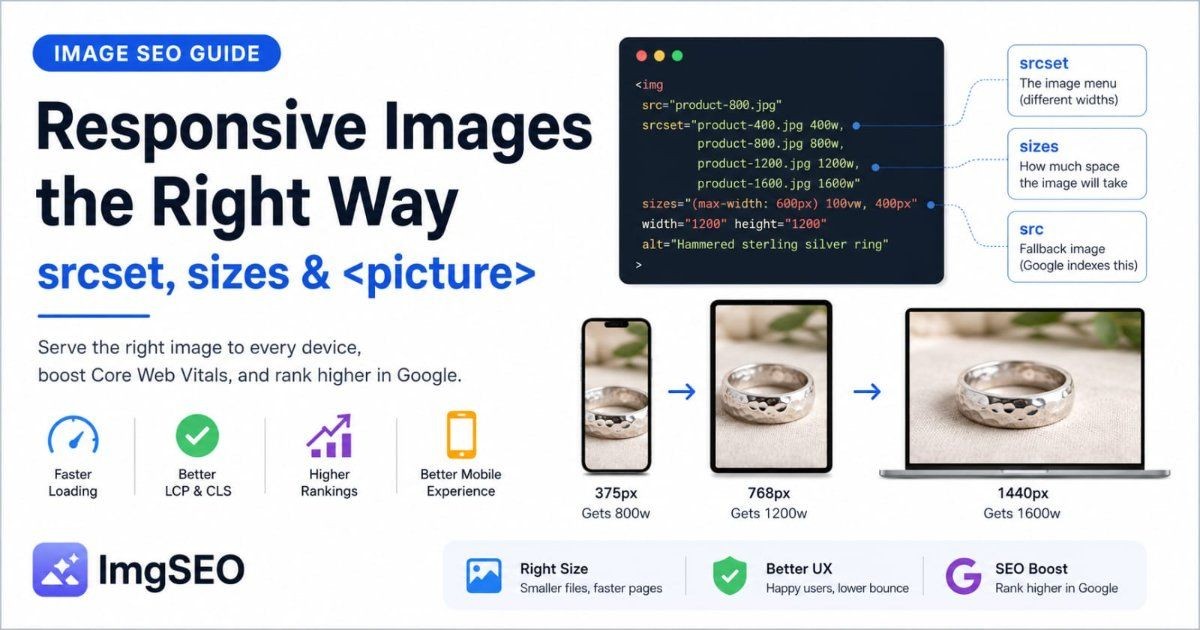
Image delivery determines which file a browser downloads, when it downloads it, and how much layout space the page reserves. This guide focuses on that technical layer rather than repeating detailed filename, alt-text, or compression guidance.
Key Takeaways
- Serve dimensions close to the rendered size and use responsive image markup so smaller screens do not download oversized files.
- Do not lazy-load the likely Largest Contentful Paint image. Prioritize it carefully and lazy-load eligible offscreen images.
- Measure real pages before and after changes. No format, file-size target, or plugin guarantees a Core Web Vitals or ranking improvement.
Start with the rendered image, not the source file
A 3000-pixel source image may be appropriate for editing or zoom, but it should not automatically be sent to a 400-pixel product card. Identify each placement's rendered dimensions and required device density before producing variants.
For a typical commerce site, review:
- collection and search-result thumbnails
- primary product images
- product-gallery thumbnails
- zoom or lightbox images
- full-width hero images
- editorial and recommendation cards
Keep original assets where your workflow needs them, then generate delivery variants for actual page placements.
Use responsive image markup
The srcset attribute lets the browser choose from several image widths. The sizes attribute tells it how much viewport space the image is expected to occupy.
<img
  src="product-800.webp"
  srcset="product-400.webp 400w, product-800.webp 800w, product-1200.webp 1200w"
  sizes="(max-width: 640px) 100vw, 50vw"
  width="800"
  height="800"
  alt="Black running shoe with breathable mesh upper"
>
The browser combines that information with the device viewport and pixel density. Incorrect sizes values can still make it choose an unnecessarily large candidate, so verify requests in browser developer tools. The responsive images guide covers the markup in detail.
Reserve width and height
Explicit width and height attributes give the browser an aspect ratio before the image loads. That reserved space helps prevent surrounding content from shifting.
CSS can still make the image responsive:
img {
  max-width: 100%;
  height: auto;
}
Use the source aspect ratio in the attributes and avoid changing it unexpectedly in CSS.
Choose formats from the content and delivery stack
No single format wins for every asset:
| Format | Common fit | Check before adopting | |---|---|---| | JPEG | Broadly compatible photography | Quality and file size at the required dimensions | | PNG | Lossless graphics and transparency | Whether the larger transfer size is justified | | WebP | Photographs and graphics with broad browser support | Encoder quality and your platform's processing | | AVIF | Efficient photographic delivery in supported workflows | Encode cost, decode behavior, and fallback strategy |
Compare representative exports at the intended display and zoom sizes. For compression decisions, use the dedicated e-commerce image compression guide.
Load the likely LCP image deliberately
The primary hero or product image is often the Largest Contentful Paint candidate, but measure the page to confirm. If it is the LCP image:
- do not apply lazy loading to it
- make the URL discoverable in the initial markup
- consider an appropriate preload or
fetchpriority="high" - avoid competing high-priority downloads
- keep server and CDN response times under observation
Prioritizing several images can be counterproductive. Reserve high priority for the small number of assets that genuinely need it.
Lazy-load offscreen images
Native loading="lazy" is useful for images below the initial viewport. It can reduce unnecessary startup transfers, especially on long product and editorial pages.
Do not apply it mechanically to every image. The lazy-loading guide explains how to separate above-the-fold and offscreen assets.
Configure caching and CDN transformations carefully
Long-lived caching can reduce repeat transfers when image URLs are versioned or content-addressed. A CDN can reduce network distance and may generate format or dimension variants.
Verify the delivered result:
- content type matches the encoded format
- cache headers fit the URL versioning strategy
- transformed dimensions match the request
- quality settings preserve important product detail
- canonical page markup still points to crawlable assets
CDN processing may also replace or remove file-level metadata. Keep essential descriptions and product facts in page-level fields.
Measure Core Web Vitals on representative pages
Use field data when available and lab tools for diagnosis. Review several page types rather than testing only the homepage.
For image delivery, investigate:
- whether an image is the LCP element
- when the browser discovers its URL
- transfer size and selected responsive candidate
- server and CDN response time
- layout shifts caused by missing dimensions
- below-the-fold transfers competing during startup
Core Web Vitals contribute to Google's page-experience systems, but performance is one part of a broader search system. A faster image does not guarantee a ranking change.
Keep the other image SEO tasks in their own workflows
Technical delivery works alongside, but does not replace:
- accessible alt text and textual descriptions
- descriptive filename remediation
- compression and visual-quality testing
- relevant page copy and structured product information
That separation keeps troubleshooting clear: filenames describe and organize assets, alt text communicates purpose, compression balances quality and transfer size, and delivery controls what the browser actually requests.