
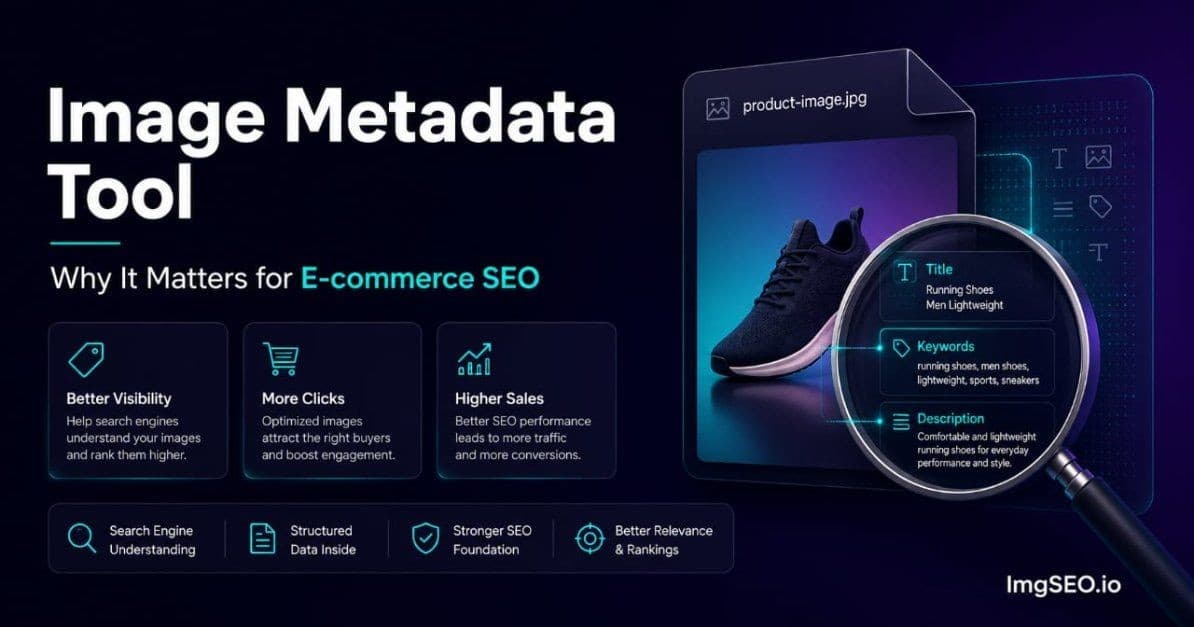
There is an SEO signal embedded in every product photo on your store that most sellers have never touched. It is not your alt text. It is not your filename. It lives inside the image file itself, invisible in the browser, but read directly by Google when it crawls your product images.
That signal is image metadata — and an image metadata tool is what embeds it.
This article explains what image metadata actually is, why it matters for e-commerce SEO, how tools that embed it work, and how to verify that metadata was actually written into your files. By the end you will understand a technical layer of image SEO that most of your competitors do not know exists.
Key Takeaways
- Image metadata (EXIF and XMP) lives inside the file itself and is readable by Google independently of the alt text or filename you set on the platform.
- XMP is the format that matters most for SEO — it supports Title, Description, and an unlimited Keywords field; EXIF was built for camera data and has limited text support.
- In our experience running ImgSEO, well under 5% of sellers embed this metadata at all, which makes it one of the least-contested SEO signals available in e-commerce.
What Is Image Metadata
Image metadata is structured data stored inside an image file. It travels with the file wherever it goes and is readable by any software — including Google's crawler — that knows how to look for it.
The Two Types That Matter for SEO
EXIF (Exchangeable Image File Format) was developed for digital cameras. When you take a photo with a DSLR, your camera automatically writes EXIF data into the file: shutter speed, aperture, focal length, GPS coordinates, timestamp. EXIF also has text fields, but they were not designed with SEO in mind.
XMP (Extensible Metadata Platform) was developed by Adobe and introduced in 2001. It is a more flexible standard built on XML, and it supports the fields that matter for SEO: a title, a description, and an unlimited list of keywords. XMP is the format that an image metadata tool writes when it is doing its job correctly.
Both types live inside the image file itself, not in a database or a platform's backend. They are invisible in a browser but fully accessible to software that reads the file directly.
What Metadata Looks Like
You can see image metadata right now on any file on your computer. On Windows, right-click any image file, choose Properties, then click the Details tab. You will see fields labeled Title, Subject, Tags, and Comments. On Mac, select a file and press Cmd+I to open Get Info, then expand the More Info section.
Open a product photo from your store and look at those fields. For most e-commerce sellers, every field is completely empty.
Why Metadata Exists
Metadata was originally a photographer's tool. Photojournalists used it to attach caption information, copyright notices, and bylines to images so that information traveled with the file when it was transmitted to newsrooms. Stock photo agencies used it to make images searchable in their internal catalogs.
E-commerce repurposes that infrastructure for product SEO. The technical format is identical — the same EXIF and XMP standards, the same fields, the same file-level embedding. The strategic purpose shifts from journalism workflow to search visibility.
Why Image Metadata Matters for SEO
Google Reads Metadata Before Platform Processing
Here is the insight that makes metadata worth adding even on platforms that strip it: Google crawls your image URL directly, often before a platform like Etsy or Shopify has finished processing the upload.
When you upload a product photo, the platform receives the original file and queues it for processing — resizing, compression, format conversion, CDN distribution. That processing takes time, sometimes seconds, sometimes longer depending on platform load. Google's crawler does not wait. If Googlebot discovers the image URL during that window, it fetches the original file, which still contains the metadata you embedded.
This creates a real SEO opportunity window. It is brief, but it is real, and it costs nothing to take advantage of once you have a tool that handles metadata embedding automatically.
Metadata as a Trust Signal
Alt text is added through a platform's interface — a text field you type into after upload. It is easy to fill in, easy to leave blank, and straightforward to keyword-stuff. Metadata embedded in the image file itself is a different kind of signal.
Google treats metadata as more "native" evidence of what an image contains because it requires deliberate action at the file level rather than a form field in a dashboard. It indicates that the creator of the image, not the platform, labeled the content. That distinction matters to how Google weighs the signal relative to platform-side metadata.
The Competitive Reality
In our experience, well under 5% of e-commerce sellers add image metadata to their product photos. Among sellers who do optimize alt text — already a minority — almost none also embed metadata into the file itself.
This is one of the most under-utilized SEO levers in e-commerce. When a tactic is both effective and ignored by 95% of your competitors, the return on implementing it is disproportionately high. You are not fighting for a marginal gain against an optimized field — you are gaining something most competitors have zero of.
For a deeper look at the full metadata embedding process, see how to add metadata to product images.
What an Image Metadata Tool Does
Core Function
An image metadata tool takes your product photo as input and produces a new image file as output. Between input and output, it does three things:
- Analyzes the image content — either visually (AI-powered tools) or from a title you provide
- Generates an SEO-optimized title, description, and keyword set
- Writes that data into the image file using XMP and EXIF standards
The output file looks identical to the input in a browser. The metadata is invisible to a human viewer but fully readable by Google's crawler, EXIF viewer software, and any platform that reads file-level metadata before stripping it.
What Good Metadata Contains
A well-configured image metadata tool writes at minimum three fields:
XMP Title — A concise, keyword-rich product name. Think of this as the product's SEO title, not its marketing headline. It should describe what the object is before describing how great it is.
XMP Description — One or two sentences covering material, style, color, size, and intended use. This is the field closest to what Google uses as a text-based signal for image content. It should read naturally while including the terms a buyer would search.
XMP Keywords — A list of 10 to 15 keyword phrases covering the full range of ways a buyer might search for this product. Not single words — phrases. These map to actual search queries.
Example Metadata Output
Here is what good metadata looks like for a specific product:
Product: handmade ceramic mug
XMP Title: Wheel Thrown Stoneware Mug Speckled Glaze Handmade
XMP Description: Handmade stoneware coffee mug with speckled cream glaze, wheel thrown on a pottery wheel, 12oz capacity, microwave and dishwasher safe. Artisan pottery made to order.
XMP Keywords: stoneware mug, wheel thrown pottery, speckled glaze mug, handmade ceramic mug, coffee mug gift, artisan pottery mug, handmade stoneware, pottery coffee cup, ceramic drinkware, unique coffee mug, pottery gift, wheel thrown mug, speckled ceramics, handmade pottery gift, stoneware coffee cup
Every keyword in that list maps to a real search query. Together they cover the product across material, process, style, use case, and gift-search intent — the full spectrum of how buyers find this type of item.
Manual vs Tool-Based Metadata Embedding
The Manual Method (Adobe Lightroom)
Lightroom allows you to add metadata in the Library module's Metadata panel. You type the title, description, and keywords manually, then export the file with metadata preserved.
Time cost: 5 to 10 minutes per image. You write the content from scratch for every product photo. Requires an Adobe Creative Cloud subscription at roughly $55 per month. Practical for photographers who live in Lightroom. Impractical for sellers with catalogs of 50 or 500 products.
The Manual Method (ExifTool)
ExifTool is a free, open-source command-line utility. It can read and write every metadata field in every image format. The syntax looks like this:
exiftool -XMP:Title="Wheel Thrown Stoneware Mug" -XMP:Description="Handmade ceramic..." -XMP:Subject="stoneware mug, ceramic mug, handmade pottery" product.jpg
Time cost: 3 to 5 minutes per image once you are comfortable with the command-line syntax. No subscription required. Requires comfort with a terminal and knowledge of which flags to use for which fields. Not practical for sellers who are not technically inclined.
The AI Tool Method
AI-powered image metadata tools like ImgSEO take a fundamentally different approach. You upload the image, the tool analyzes it visually, generates the title, description, and keyword set automatically, and embeds everything in the output file. The process takes 10 to 15 seconds per image.
No subscription to creative software. No manual copywriting. No command-line knowledge. The output is a download-ready image file with metadata already embedded.
At scale — 50 product images, 200 product images, a new collection every season — the time difference between manual and AI-powered metadata is not marginal. It is the difference between a tactic you will actually use and one you intend to use someday.
What to Look for in an Image Metadata Tool
Must-Have Features
Not all image metadata tools embed the same fields. The minimum requirement for SEO purposes is XMP support — specifically the ability to write XMP Title, XMP Description, and XMP Keywords (also called Subject in some implementations). A tool that only writes EXIF fields is missing the fields that Google reads for content context.
The tool should also generate content from visual analysis of the image, not just reformat a title you provide. If the tool requires you to write the description yourself, you have only automated the embedding step — you still have to do the SEO copywriting work.
Quality preservation matters. Metadata embedding should not re-compress the image or alter pixel data. A good tool writes metadata into the file container without touching the image itself.
Format Compatibility
JPEG — Full EXIF and XMP support. Works on every platform. This is the format to optimize for first.
WebP — XMP support varies by tool. Some tools support it fully; others do not. Shopify serves WebP by default for delivery but typically stores the JPEG original — embed metadata in the JPEG source.
PNG — Limited metadata support compared to JPEG. PNG has its own text chunk format but it is not as widely read as EXIF/XMP.
AVIF — Emerging format with developing metadata support. Not a priority for most e-commerce catalogs today.
If your platform accepts JPEG uploads, embed metadata in JPEG files and upload those. JPEG remains the most reliable format for metadata preservation across e-commerce platforms.
Batch Processing
A tool that processes one image at a time is fine for testing and for sellers with very small catalogs. For anything beyond a handful of products, batch ZIP processing is essential. You upload a ZIP of product images, the tool processes them all, and you download a ZIP of processed files.
The time savings compound: at 10 seconds per image, 100 images takes under 20 minutes in batch. At 5 minutes per image manually, the same 100 images takes over 8 hours.
How to Verify Metadata Was Actually Embedded
Adding metadata does nothing if the embedding step fails. Always verify before uploading to your store.
Quick Verification Methods
Windows: Right-click the processed image file → Properties → Details tab. Look for the Title, Subject, Tags, and Comments fields in the Description section.
Mac: Select the file → Cmd+I → expand More Info. Look for the same fields.
Online: Upload the file to a free EXIF viewer tool. Search "EXIF viewer online" — several free options exist. Look specifically for XMP fields, not just EXIF — some viewers only show camera data.
What You Should See
If metadata was embedded correctly:
- Title field: Not empty. Contains a product description phrase.
- Keywords/Tags: Multiple phrases listed, separated by commas or semicolons.
- Description/Subject: A sentence or two describing the product.
If those fields are empty, metadata was not embedded. The tool either failed silently or only wrote EXIF fields. Try a different tool or check the export settings.
Common Verification Mistakes
The most common mistake is checking the wrong file — verifying the original you uploaded rather than the processed output you downloaded. Always verify the output file.
Some EXIF viewers only display camera data (ISO, shutter speed, aperture) and do not show XMP fields at all. If you see camera data but no text fields, switch to a viewer that explicitly shows XMP metadata.
The Metadata Strategy for Different Platforms
Etsy Metadata Strategy
Etsy strips most embedded metadata during image processing. Despite this, adding metadata before upload is still worthwhile for two reasons: Google may crawl before processing completes, and the practice costs nothing once you have a tool that handles it automatically.
Treat metadata as a complement to Etsy alt text, not a replacement. Alt text is your primary signal on Etsy; metadata is the secondary reinforcement that works during the crawl window. For a complete Etsy image SEO strategy, see Etsy image SEO guide.
Shopify Metadata Strategy
Shopify generally preserves more metadata than Etsy during image processing. On Shopify, a well-optimized product image can carry three reinforcing signals simultaneously: a descriptive keyword-rich filename, strong alt text added through the admin, and embedded XMP metadata in the file itself.
This triple-signal approach — filename, alt text, and embedded metadata — creates a more complete picture for Google than any single optimization alone. See the Shopify image SEO guide for how to configure all three.
WooCommerce Metadata Strategy
WooCommerce is self-hosted, which means metadata handling depends on your server configuration, CDN setup, and any image optimization plugins you are running. In most cases WooCommerce preserves more metadata than hosted platforms because there is less processing between upload and delivery.
The higher preservation rate makes metadata especially valuable on WooCommerce. Pair embedded metadata with a properly configured XML image sitemap to give Google the clearest possible picture of your product catalog.
Common Misconceptions About Image Metadata
Misconception 1: "Platforms strip it, so why bother"
The platforms-strip-it objection is the most common reason sellers skip metadata. It misses the crawl timing point. Google does not wait for platform processing to complete. The metadata window between upload and processing is real, it recurs with every upload, and it costs nothing to take advantage of.
Beyond the crawl window, metadata also survives in cases where the original file is served rather than a processed derivative — which happens more often on self-hosted stores and CDN configurations that bypass transformation.
Misconception 2: "Alt text is enough"
Alt text and embedded metadata are not the same signal and do not serve the same purpose. Alt text is a platform-side label added through an interface. Metadata is a file-level signal embedded before the file ever reaches a platform. They reinforce each other — neither replaces the other.
A product image with both strong alt text and embedded metadata sends more complete signals to Google than one with only alt text. Adding metadata does not diminish the value of alt text; it adds to it.
Misconception 3: "Metadata tools are only for photographers"
This misconception comes from the history of the format — EXIF and XMP were built for photography workflows. But the tools that use these standards are not limited to photographers. E-commerce sellers are increasingly the primary beneficiaries of image metadata tools, and modern AI-powered tools are built specifically for the product photo use case, not the photojournalism one.
The technology is the same. The application has expanded.
The Bottom Line
Image metadata is one of the most under-utilized SEO signals in e-commerce. Most sellers have never opened the metadata fields on a single product photo. Of those who have optimized alt text, almost none have also embedded metadata into the file itself.
The window between upload and platform processing gives Google a real opportunity to read embedded metadata. Combined with descriptive filenames and strong alt text, embedded metadata creates a more complete and reinforcing image SEO profile than any single optimization alone.
An AI-powered image metadata tool makes the process practical at scale — 10 to 15 seconds per image, no manual copywriting, no technical knowledge required. Try ImgSEO free and see the metadata embedded in your own product images.
For a step-by-step walkthrough of the full embedding process, see how to add metadata to product images.


